Architecting for on-device inference means optimizing for three non-negotiable constraints: strict latency for real-time interaction, minimal power consumption for battery life, and limited memory/storage. This moves beyond simple model selection to encompass the entire stack, from quantization (using methods like GPTQ or AWQ) to reduce model size, to model compilation with frameworks like TensorFlow Lite or ONNX Runtime for hardware acceleration. The goal is to achieve a predictable performance envelope within these physical limits.

Guide
How to Architect an SLM for On-Device Inference
A developer guide to designing, optimizing, and deploying Small Language Models that run efficiently on mobile devices, edge servers, and IoT hardware.
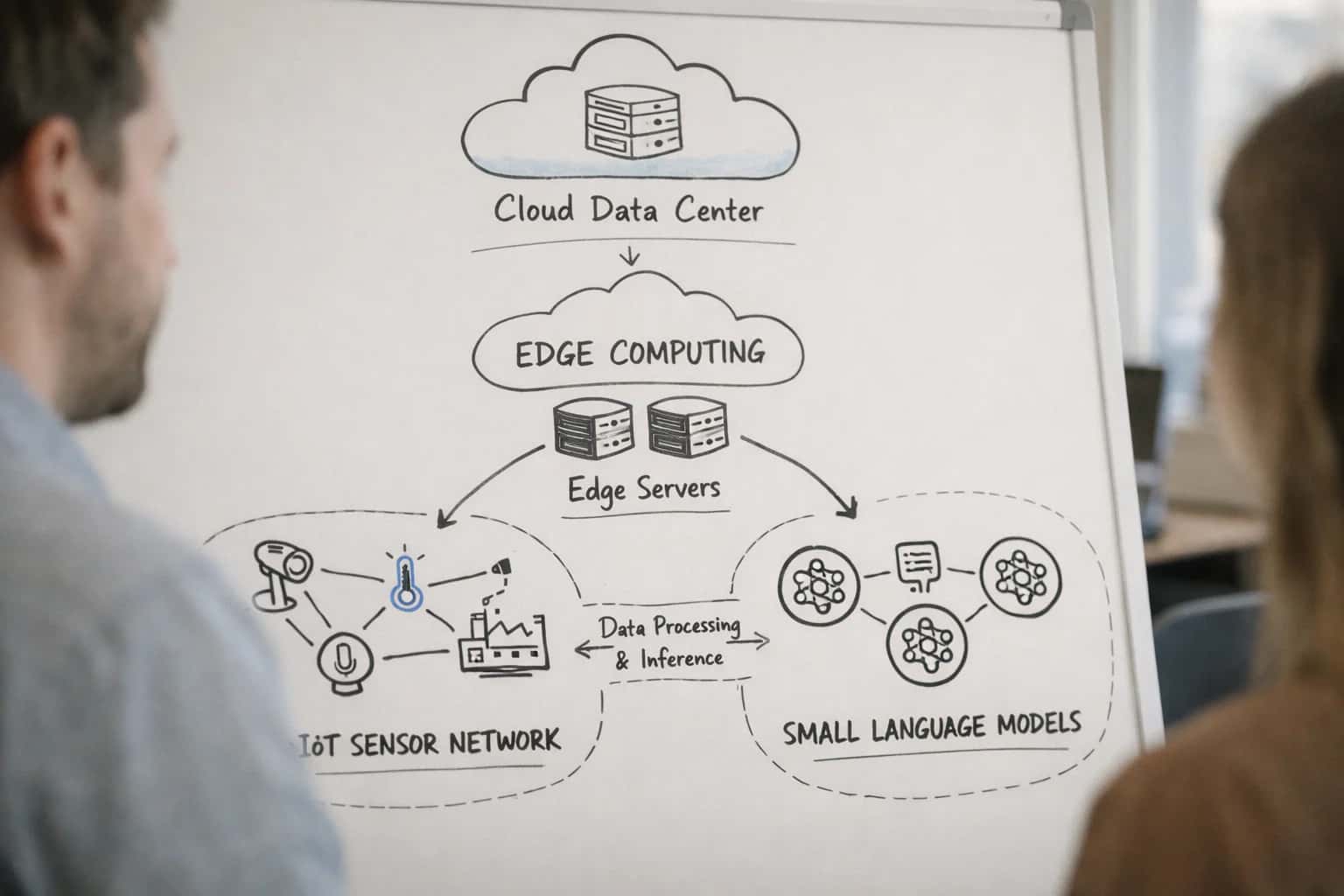
Deploying a Small Language Model (SLM) directly on a mobile or edge device requires a fundamental shift in design philosophy, prioritizing extreme efficiency over raw capability.
Your architecture must balance model accuracy against these resource ceilings. Start by profiling your target hardware to understand its capabilities, then design a memory-aware model pipeline. This involves selecting an appropriately sized base model, applying aggressive quantization, and implementing efficient attention mechanisms. Success is measured by a model that delivers reliable, low-latency responses without draining the battery or exceeding available RAM, enabling truly autonomous and responsive applications. For a strategic overview, see our guide on How to Architect a Task-Specific SLM Strategy for Your Product.
ON-DEVICE INFERENCE
Key Architectural Concepts
Deploying a Small Language Model (SLM) on mobile or edge hardware requires a specialized architectural approach. These concepts form the foundation for balancing performance, accuracy, and resource constraints.
03
Memory-Aware Architecture
Design your model and inference pipeline to operate within strict, often volatile, memory budgets. This prevents crashes and ensures smooth operation.
- Model Pruning: Removes redundant neurons or weights to shrink the model footprint. Techniques include magnitude-based and structured pruning.
- Knowledge Distillation: Trains a smaller student model to mimic a larger teacher model, preserving capability in a compact form.
- Dynamic Batching & Caching: Implement inference-time strategies like adaptive batching and KV-caching to manage peak memory usage during text generation.
04
Latency vs. Accuracy Trade-Offs
On-device inference forces explicit engineering decisions between speed and quality. You must define acceptable thresholds for your use case.
- Measure End-to-End Latency: Include tokenization, model inference, and post-processing in your benchmarks.
- Use Progressive Techniques: Start with a heavily quantized model; if accuracy is insufficient, selectively increase precision (mixed-precision inference) only where needed.
- Hardware-Specific Optimization: Leverage hardware accelerators like NPUs (Neural Processing Units) or GPUs on target devices, which may favor certain operator types or data layouts.
05
Power & Thermal Constraints
Continuous AI inference drains batteries and generates heat. Architecture must prioritize energy efficiency to be viable for consumer devices.
- Inference Scheduling: Batch requests and use low-power states during idle periods.
- Efficient Operators: Choose model architectures with operators known for low FLOPs (Floating Point Operations), such as depthwise convolutions or grouped attention.
- Dynamic Voltage and Frequency Scaling (DVFS): Coordinate with the device OS to run inference at the lowest sufficient clock speed to conserve power.
06
Robust Deployment Patterns
On-device models must handle offline scenarios, version updates, and diverse hardware without a server safety net.
- A/B Testing & Canary Releases: Roll out new model versions to a subset of users to monitor real-world performance and stability.
- Fallback Mechanisms: Design graceful degradation, such as falling back to a rule-based system or a cached response if the model fails or times out.
- Model Encryption & Obfuscation: Protect your intellectual property by encrypting model files on disk and only decrypting in memory during execution.
FOUNDATION
Step 1: Define Hardware and Performance Constraints
Before writing a single line of model code, you must establish the non-negotiable physical and performance boundaries of your target device. This step prevents costly architectural mistakes.
On-device inference means your model must fit within the hardware envelope of the target platform. Start by profiling the memory (RAM), storage (ROM), compute (CPU/GPU/NPU), and thermal/power budget. For example, a mobile phone may have a 100MB RAM limit and require sub-100ms latency, while an IoT sensor might have only 10MB of total storage. These constraints directly dictate your model's maximum parameter count and acceptable complexity.
Translate these limits into technical specifications. Use the memory budget to calculate your maximum model size after quantization. Use the latency target and processor type to determine feasible model architecture depth and width. A common mistake is optimizing only for accuracy; you must design for the power-performance-accuracy trade-off from day one. Tools like TensorFlow Lite's Benchmark Tool are essential for this profiling phase.
ON-DEVICE INFERENCE
Optimization Technique Trade-Offs
A comparison of core techniques for balancing model performance, size, and latency under strict hardware constraints.
| Technique | Quantization | Pruning | Knowledge Distillation | Model Compilation |
|---|---|---|---|---|
Primary Goal | Reduce model size & memory | Remove redundant parameters | Transfer knowledge to a smaller model | Optimize execution for target hardware |
Typical Size Reduction | 2x - 4x (INT8) | 10% - 50% | 10x - 100x | 0% (Optimizes runtime) |
Accuracy Impact | 0.5% - 2% loss (Post-Training) | 0.1% - 5% loss (Structured) | < 1% loss (with good teacher) | Negligible |
Inference Speedup | 2x - 3x | 1.1x - 2x | 5x - 20x | 1.5x - 5x |
Hardware Support | ✅ (CPU, GPU, NPU) | ✅ (CPU, GPU) | ✅ (All) | ✅ (Specific to compiler) |
Retraining Required | ❌ (PTQ) / ✅ (QAT) | ✅ | ✅ | ❌ |
Best For | Immediate memory savings | Removing model 'bloat' | Creating tiny, fast student models | Maximizing hardware utilization |
Key Tools | GPTQ, AWQ, TensorRT | Magnitude/Activation Pruning | DistilBERT, TinyLlama | TensorFlow Lite, ONNX Runtime, Core ML |
ON-DEVICE DEPLOYMENT
Step 4: Design Memory-Aware Inference Architecture
This step focuses on the core architectural decisions that enable a Small Language Model (SLM) to run efficiently within the strict memory and compute constraints of edge devices like phones, IoT sensors, or embedded systems.
A memory-aware architecture prioritizes inference efficiency over raw parameter count. This involves selecting a model compilation target like TensorFlow Lite or ONNX Runtime that optimizes the computational graph for your specific hardware. You must profile memory bandwidth and cache hierarchies to minimize data movement, the primary energy cost. Techniques like operator fusion and selecting efficient attention mechanisms (e.g., grouped-query attention) are critical for reducing latency and power draw on resource-limited chips.
Design for static memory allocation where possible to avoid the overhead of dynamic allocation during inference. Use quantization-aware training or post-training quantization (e.g., GPTQ, AWQ) to shrink model weights to 8-bit or 4-bit precision, dramatically reducing the model's RAM footprint. Finally, implement model partitioning to load only necessary layers into memory for a given task, a key strategy for running models larger than the device's available RAM. This approach is detailed further in our guide on Edge Inference and Distributed Computing Grids.
Enabling Efficiency, Speed & Accuracy
Intelligent Analysis, Decision & Execution
We build AI systems for teams that need search across company data, workflow automation across tools, or AI features inside products and internal software.
Talk to Us
Search across company data
Give teams answers from docs, tickets, runbooks, and product data with sources and permissions.
Useful when people spend too long searching or get different answers from different systems.
Enterprise searchRAGPermissions
Read more
Automate internal workflows
Use AI to route work, draft outputs, trigger actions, and keep approvals and logs in place.
Useful when repetitive work moves across multiple tools and teams.
AI agentsWorkflow automationGovernance
Read more
Add AI to products and internal tools
Build assistants, guided actions, or decision support into the software your team or customers already use.
Useful when AI needs to be part of the product, not a separate tool.
AI integrationDecision supportModel routing
Read moreON-DEVICE SLM ARCHITECTURE
Common Mistakes
Architecting a Small Language Model for on-device inference introduces unique constraints. Avoid these common pitfalls to ensure your model is fast, efficient, and reliable in production.
This is almost always a memory constraint issue. On-device hardware has strict RAM limits. The mistake is exporting a model without proper quantization or pruning.
Fix:
- Quantize the model post-training using GPTQ or AWQ for 4-bit or 8-bit precision.
- Apply structured pruning to remove non-essential neurons.
- Always check the model's memory footprint after optimization against the device's available RAM. Use tools like
onnxruntimeto profile memory usage before deployment.
For a deeper dive into these techniques, see our guide on Knowledge Distillation and Model Pruning for Sustainability.

About the author
Prasad Kumkar
CEO & MD, Inference Systems
Prasad Kumkar is the CEO & MD of Inference Systems and writes about AI systems architecture, LLM infrastructure, model serving, evaluation, and production deployment. Over 5+ years, he has worked across computer vision models, L5 autonomous vehicle systems, and LLM research, with a focus on taking complex AI ideas into real-world engineering systems.
His work and writing cover AI systems, large language models, AI agents, multimodal systems, autonomous systems, inference optimization, RAG, evaluation, and production AI engineering.
LinkedIn
Limited slotsGet a Free AI Consultation
Partnered with leading AI, data, and software stack.





How We Work
Custom AI workflows for your Business
One-fit-all AI don't work for modern businesses. At Inferensys, we aim to understand your business & custom requirements; which we use to define most efficient agentic workflows, the data, and the tools for your business.
01
Review the use case
We understand the task, the users, and where AI can actually help.
Read more02
Pick the right approach
We define what needs search, automation, or product integration.
Read more03
Build the first useful version
We implement the part that proves the value first.
Read more04
Improve from there
We add the checks and visibility needed to keep it useful.
Read moreThe first call is a practical review of your use case and the right next step.
Talk to Us