
Inferensys

Integration

AI-Powered Mobile Device Management for Retail

Integrate AI with retail MDM platforms to predict POS failures, automate app deployments for promotions, and optimize support for handheld scanners and kiosks.
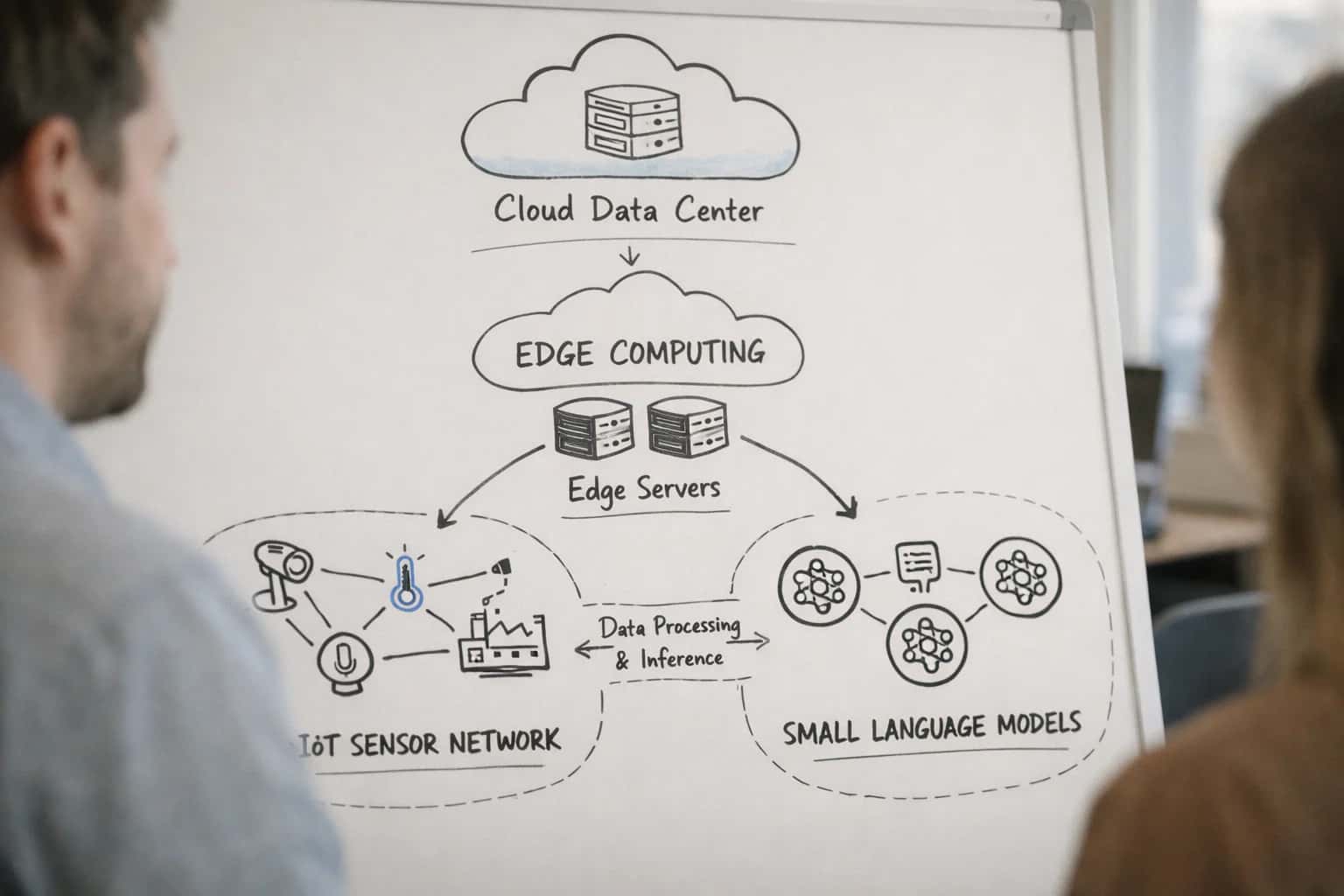
Engineer deploying small language model to edge device, IoT sensor visible on desk, technical hardware setup in bright workspace.
ARCHITECTURE & ROLLOUT

Where AI Fits in Retail Device Management

AI integrates into retail MDM workflows to automate support, predict hardware failures, and dynamically manage in-store devices.

AI connects to the MDM platform's REST API (like Jamf Pro, Microsoft Intune, or VMware Workspace ONE) and its core data objects: device inventory records, configuration profiles, script execution logs, and compliance reports. The integration surfaces operate at three levels:

  • Policy & Configuration Layer: AI analyzes device telemetry (battery health, storage, crash logs) to recommend or automatically push new configuration profiles or scripts for optimization.
  • Application Management Layer: AI uses app inventory and usage data to intelligently assign or revoke applications—like pushing a promotional app to all POS devices in a specific region or blocking non-compliant software.
  • Support & Remediation Layer: AI consumes alert queues and ticket data from integrated ITSM tools to auto-diagnose common POS, handheld scanner, or kiosk issues and execute predefined remediations via MDM scripts.


For a typical retail rollout, the AI layer is deployed as a middleware service that subscribes to MDM webhooks for events like device.noncompliant or application.installed. It processes this data alongside business context from a retail operations platform (like inventory levels or promotion schedules). High-value workflows include:

  • Predictive Lane Failure: AI models analyze historical failure data (from MDM logs) and real-time diagnostics to predict checkout lane POS device failures, automatically generating a service ticket in the FSM platform and pre-staging a replacement device profile in the MDM.
  • Dynamic Promotional App Deployment: An AI agent monitors promotion calendars and store traffic data, triggering the MDM API to install or update promotional kiosk apps on a schedule that minimizes operational disruption.
  • Automated Support Triage: When a handheld scanner repeatedly disconnects (flagged in MDM logs), the AI cross-references recent configuration changes, identifies a likely problematic Bluetooth profile, and rolls it back automatically, notifying the store's lead technician.

Governance is critical. AI-driven actions should flow through an approval queue for high-risk commands (like remote wipe) or when impacting more than a configurable percentage of the fleet. All actions must write an immutable audit log back to the MDM or a separate governance platform, recording the AI agent's ID, the rationale (e.g., "predicted battery failure probability >85%"), and the executed API call. Rollout follows a phased approach: start with read-only analytics and alerting on a single store's device group, progress to automated remediations for low-risk, high-frequency issues (e.g., clearing cache on digital signage players), and finally scale to predictive, cross-platform workflows. This controlled approach builds trust in the AI's decision-making while delivering incremental operational value, such as reducing the mean time to repair (MTTR) for common device issues from hours to minutes.

ARCHITECTURE BLUEPRINT

Key MDM Integration Surfaces for Retail AI

Core Device Control Surfaces

Integrate AI with the MDM's device object APIs to manage point-of-sale terminals, self-service kiosks, and handheld scanners. Key surfaces include:

  • Inventory & Telemetry: Pull real-time device health data (battery, storage, uptime, OS version) to feed predictive failure models.
  • Configuration Profiles: Use AI to dynamically assign or update profiles that lock devices into single-app kiosk mode, enforce secure payment settings, or adjust display brightness based on store hours.
  • Remote Actions: Automate commands like RestartDevice, RefreshInventory, or RotateWiFiPassword via API when AI detects performance degradation or security anomalies.

Example Workflow: An AI agent monitors battery health across all handheld scanners. When a device's battery degradation curve predicts failure within 48 hours, it automatically creates a service ticket and triggers an MDM command to set the device's maximum battery charge to 80% to prolong life until replacement.

RETAIL OPERATIONS

High-Value AI Use Cases for Retail MDM

Integrate AI with your Mobile Device Management (MDM) platform to transform how you manage POS systems, handheld scanners, and customer-facing kiosks. These use cases focus on reducing downtime, automating support, and optimizing in-store workflows.

01

Predictive Failure for Checkout Lanes

AI models analyze MDM telemetry (CPU temp, storage health, battery cycles from UPS) from POS terminals to predict hardware failures. Automatically generates work orders in your FSM platform and triggers MDM scripts to run diagnostics or reboot lanes during off-peak hours.

Downtime → Hours
Reduction
02

Dynamic App Deployment for Promotions

An AI agent ingests promotion calendars from your CMS or PIM and uses MDM APIs (like Jamf or Intune) to dynamically push promotional apps or configuration profiles to kiosks and tablets. Removes outdated apps post-campaign to free up space.

Batch → Event-Driven
Deployment Model
03

Automated Kiosk Mode & Content Management

AI manages MDM kiosk lockdown profiles on interactive displays. Based on time of day, foot traffic analytics, or inventory levels, it automatically switches kiosk modes (e.g., from product lookup to checkout) and updates displayed content via integrated digital signage APIs.

04

Intelligent Handheld Scanner Support

An AI copilot for backroom and floor staff. Integrates with MDM (like SOTI or Zebra's OEM tools) to diagnose scanner connectivity issues, suggest fixes, and if needed, auto-push Wi-Fi or Bluetooth configuration profiles. Reduces calls to IT for simple re-pairing.

Tier 1 → Self-Service
Support Shift
05

Compliance & Security Posture Automation

AI continuously audits MDM compliance reports for retail-specific policies (PCI-DSS scoping, screen lock timers, encrypted storage). Automatically remediates non-compliant devices by pushing security profiles or quarantining devices from the payment network via NAC integration.

06

Smart Device Lifecycle & Spare Pool Management

AI analyzes MDM inventory data (usage hours, repair history, OS EOL dates) to forecast device replacement needs for each store. Automatically triggers procurement workflows and manages the spare device pool by pre-staging replacements with MDM enrollment profiles.

Reactive → Predictive
Replacement Model
PRACTICAL AUTOMATION PATTERNS

Example AI-Driven Retail MDM Workflows

These workflows illustrate how AI agents can consume telemetry from platforms like Jamf, Intune, or Workspace ONE and execute actions via their APIs to automate critical retail operations, reduce downtime, and improve customer experience.

Trigger: Scheduled daily analysis of MDM device health data (battery cycles, storage health, thermal events, crash logs) from all POS terminals and handheld scanners.

Context Pulled:

  • Device inventory from MDM (model, age, last maintenance)
  • Historical failure data from ITSM (ServiceNow, Jira)
  • Real-time transaction volume from the POS system

Agent Action:

  1. An ML model scores each device for failure risk in the next 7 days.
  2. For high-risk devices, the agent checks parts inventory and technician schedules.
  3. It generates a prioritized work order list.

System Update:

  • Creates a preventative maintenance ticket in the ITSM with all device context.
  • Schedules the work during off-peak hours via the workforce management system.
  • Updates the MDM record with a maintenance_scheduled tag.

Human Review Point: The store manager receives a daily digest of recommended actions for approval before tickets are auto-assigned.

AI-ENHANCED RETAIL MDM

Implementation Architecture: Data Flow & System Design

A practical blueprint for integrating AI with retail MDM platforms to manage POS systems, kiosks, and handheld scanners.

The core architecture layers AI decision-making on top of your existing MDM platform (like Jamf, Intune, or Workspace ONE). The data flow begins with the MDM's REST API continuously streaming device telemetry—battery health, storage, app crash logs, network connectivity, and geolocation from POS terminals, self-checkout kiosks, and handheld scanners. This raw data is ingested into a central processing layer where AI models analyze patterns to predict hardware failures (e.g., a scanner's battery failing during peak hours) or software issues (e.g., a POS app freezing). The AI system then triggers automated workflows back through the MDM API, such as pushing a configuration profile to throttle a failing device's performance mode or scheduling a critical app update during off-hours.

For dynamic retail operations, the design incorporates a feedback loop with promotional systems. When a promotion management platform signals a new campaign, the AI layer evaluates the current state of the in-store device fleet via the MDM inventory. It then orchestrates the phased, intelligent deployment of promotional apps or digital signage content to kiosks, prioritizing stores with high-traffic hours or devices with sufficient storage and battery headroom. This prevents overloading the network or bricking devices during crucial sales periods. Key integration points are the MDM's application management and script execution modules, allowing for conditional, AI-governed push operations.

Governance and rollout require a phased approach. Start with a pilot in a controlled store group, using the MDM's built-in device groups and staging features. The AI's recommendations should initially run in a 'recommendation-only' mode, logging proposed actions (like "recommend remote restart for kiosk ID-203") for admin review in a dashboard. Only after validating accuracy should you enable automated execution for low-risk actions. Critical commands, like a remote wipe for a lost handheld, should always require human-in-the-loop approval. Audit trails are maintained by logging all AI-initiated API calls to the MDM alongside the originating model inference and confidence score, ensuring full traceability for compliance.

AI-Powered Mobile Device Management for Retail

Code & Payload Examples for MDM API Integration

Analyzing Device Telemetry for Proactive Alerts

AI models can consume battery health, storage utilization, and crash reports from MDM APIs to predict hardware failures in Point-of-Sale (POS) systems before they impact checkout lanes. This enables proactive maintenance scheduling, reducing downtime during peak hours.

Example Python API call to fetch device health metrics from Jamf Pro:

python
import requests
import pandas as pd

# Authenticate and fetch detailed inventory for a device group
jamf_url = "https://yourcompany.jamfcloud.com"
auth = ("api_user", "api_password")

# Get mobile devices in "Checkout-Lane" group
group_id = 123
devices_response = requests.get(
    f"{jamf_url}/api/v1/mobile-devices",
    params={"section": ["GENERAL", "HARDWARE", "APPLICATIONS"]},
    auth=auth
)

devices = devices_response.json()["mobile_devices"]

# Extract key predictive features
device_health_data = []
for device in devices:
    device_health_data.append({
        "id": device["id"],
        "name": device["name"],
        "battery_level": device["hardware"].get("battery_level"),
        "storage_used_gb": device["hardware"].get("total_storage") - device["hardware"].get("available_storage"),
        "last_crash_date": device["general"].get("last_inventory_update"),  # Proxy for stability
        "app_count": len(device.get("applications", []))
    })

# Convert to DataFrame for ML inference
df_health = pd.DataFrame(device_health_data)
print(f"Collected health data for {len(df_health)} POS devices")

This data can be fed into a scikit-learn or XGBoost model trained on historical failure patterns to generate a risk score and recommended action for each device.

AI-POWERED MOBILE DEVICE MANAGEMENT FOR RETAIL

Realistic Time Savings & Operational Impact

This table illustrates the operational impact of integrating AI with MDM platforms like Jamf, Intune, and Workspace ONE to manage retail endpoints such as POS systems, handheld scanners, and digital kiosks.

Workflow / MetricBefore AI IntegrationAfter AI IntegrationImplementation Notes

POS Lane Failure Response

Reactive; 2-4 hour downtime for diagnosis and dispatch

Proactive alerting; <30 min to dispatch with predicted root cause

AI analyzes device telemetry (logs, performance) to predict failures before checkout disruption

Promotional App Rollout

Manual staging per store; 1-2 day rollout cycle

Dynamic, criteria-based deployment; same-day rollout to target stores

AI uses sales data, foot traffic, and device readiness to orchestrate app pushes via MDM APIs

Handheld Scanner Compliance

Weekly manual audit of 100+ devices for security settings

Continuous automated monitoring with daily exception reports

AI agent continuously evaluates MDM compliance data, flags deviations for review

Kiosk Content Updates

Scheduled bulk updates during off-hours, risking stale content

Dynamic content scheduling based on real-time inventory and promotions

AI integrates with CMS and MDM to push content updates based on business rules and location

Device Health & Battery Triage

Manual review of inventory reports; next-day service tickets

Automated predictive alerts for battery health; same-day remediation tickets

AI models forecast battery failure and auto-create work orders in ITSM via MDM data

Security Patch Deployment

Monthly maintenance window; manual testing and phased rollout

Risk-prioritized, automated rollout with conflict prediction

AI analyzes threat intel and device configurations to schedule patches, minimizing lane disruption

New Store Device Provisioning

Manual imaging and configuration per device; 8-16 hours per store

Zero-touch enrollment with AI-driven profile assignment; 2-4 hours setup

AI uses store attributes (size, format) to auto-assign MDM profiles, apps, and network settings

IMPLEMENTING AI IN A REGULATED RETAIL ENVIRONMENT

Governance, Security & Phased Rollout

Deploying AI for retail MDM requires a controlled approach that prioritizes operational stability, data security, and clear ROI.

A production AI integration for retail MDM must be architected with zero-trust principles. AI agents should operate with service accounts possessing the minimum necessary API permissions in Jamf Pro, Intune, or Workspace ONE—typically read-only access for inventory and analytics, with separate, audited credentials for any write actions like policy pushes or remote commands. All AI-generated actions (e.g., "schedule a battery replacement for POS terminal A-12") should be logged in an immutable audit trail, linking the decision to the specific device data, model inference, and approving admin or workflow. For PCI-DSS environments, ensure AI systems processing telemetry from payment terminals do not store or transmit cardholder data; use anonymized device IDs and aggregate health metrics instead.

Start with a phased, non-disruptive rollout. Phase 1 focuses on predictive analytics and alerting only. Deploy AI models that consume MDM inventory (battery health, storage, uptime) and network data from Meraki to predict failures for a pilot group of 50-100 non-critical devices, like back-office iPads or handheld scanners. The output is a daily report to the IT team, building trust in the predictions. Phase 2 introduces approved, low-risk automation, such as auto-creating low-priority work orders in your ITSM platform when a kiosk's storage is predicted to hit 95% within 7 days. The final phase enables closed-loop remediation for high-confidence predictions, like using a Jamf Pro script to clear cache on a digital signage player before it crashes during peak hours, but only after a 24-hour notification period to store staff.

Governance is critical for dynamic policies. Use a human-in-the-loop approval gate for any AI-recommended policy change that affects customer-facing systems. For example, an AI suggesting a dynamic app deployment for a flash promotion should generate the payload in Workspace ONE but require a retail ops manager to approve the rollout to all POS devices. Establish a weekly model review with IT and loss prevention teams to audit AI recommendations, ensuring predictions align with operational reality and security policies. Rollback plans are mandatory: any automated configuration profile pushed via MDM for AI-driven optimization must have a known-good backup profile that can be re-applied instantly if issues arise.

AI-POWERED MDM FOR RETAIL

Frequently Asked Questions (FAQ)

Practical questions for retail IT leaders evaluating AI integration for their mobile device management (MDM) platforms to manage POS systems, handheld scanners, and digital kiosks.

An AI layer integrated with your MDM platform (like Jamf or Intune) can analyze device telemetry to predict hardware failures.

Typical Workflow:

  1. Trigger: The AI system continuously ingests device health data from the MDM's inventory and extension attributes (e.g., battery cycle count, storage health, thermal events, application crash logs).
  2. Analysis: Machine learning models analyze historical failure data against current telemetry to identify devices exhibiting pre-failure patterns.
  3. Action: The system generates a predictive alert in your ITSM (like ServiceNow) or dashboard, flagging the specific lane or device.
  4. Automation: For low-risk predictions, it can trigger an MDM script to run diagnostics or schedule a maintenance reboot during off-hours. For high-risk predictions, it auto-creates a work order for a technician to replace the device before peak shopping hours.

Key Integration Points: MDM Inventory APIs, Script Execution APIs, ITSM REST API for ticket creation.

Prasad Kumkar

About the author

Prasad Kumkar

CEO & MD, Inference Systems

Prasad Kumkar is the CEO & MD of Inference Systems and writes about AI systems architecture, LLM infrastructure, model serving, evaluation, and production deployment. Over 5+ years, he has worked across computer vision models, L5 autonomous vehicle systems, and LLM research, with a focus on taking complex AI ideas into real-world engineering systems.

His work and writing cover AI systems, large language models, AI agents, multimodal systems, autonomous systems, inference optimization, RAG, evaluation, and production AI engineering.


