In a CRO, the LIMS (LabWare, LabVantage, Benchling, SampleManager) is the central system of record for sample data, but it operates within a complex ecosystem of client-specific protocols, project timelines, and data package requirements. AI integration here is not about replacing the LIMS, but about building a client-aware orchestration layer on top of it. This layer uses AI agents to understand the unique rules of each sponsor study, automate the assembly of data packages, and perform compliance cross-checks across multiple protocols before data leaves the lab.

Integration
AI Integration for LIMS in Contract Research Organizations (CROs)
Build client-project-aware AI agents for LabWare, LabVantage, Benchling, and SampleManager to automate study-specific reporting, client data package assembly, and compliance cross-checks across multiple sponsor protocols.
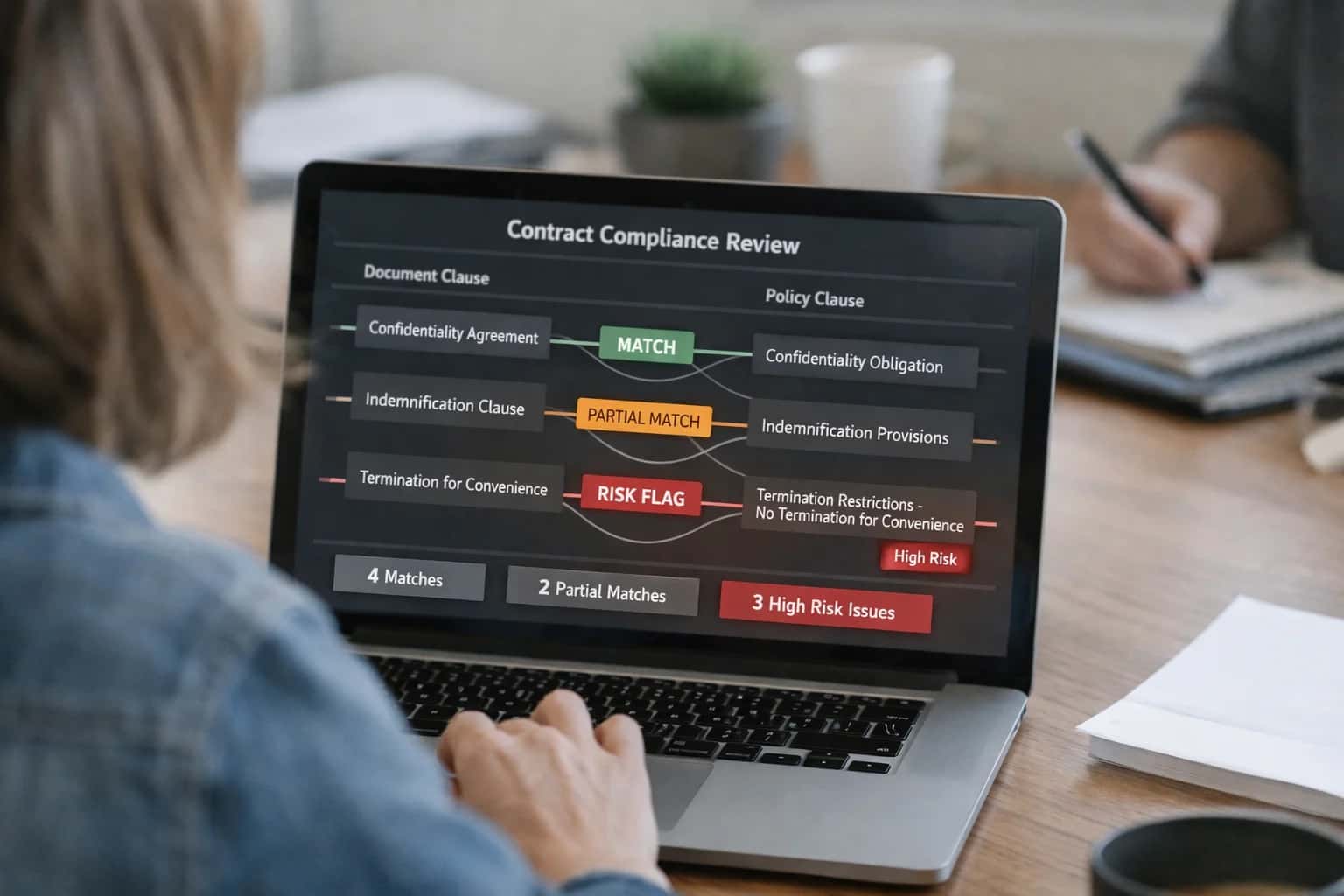
ARCHITECTURE FOR CLIENT-PROJECT AWARE AGENTS
Where AI Fits in the CRO LIMS Stack
A practical blueprint for integrating AI into CRO LIMS platforms to automate study-specific workflows and client data operations.
The integration typically connects at three key surfaces: 1) The Sample and Test Result API, where agents pull raw data tagged with study and client IDs. 2) The Document Management module, where agents parse sponsor protocols, data transfer agreements, and final report templates to understand formatting and content rules. 3) The Workflow Engine, where AI injects review steps, routes exceptions, and triggers client notifications. For example, an agent can monitor a completed stability study in LabVantage, compile results against the client's specific Statistical Analysis Plan (SAP), flag any Out-of-Trend (OOT) results with suggested commentary, and draft the summary section for the study report—all before a scientist or QA reviewer opens the file.
Rollout focuses on a single study or client pilot to refine the agent's protocol interpretation and output validation. Governance is critical: all AI-generated content (summaries, data tables, flags) must be logged in the LIMS audit trail with a clear attribution to the AI agent and remain in a draft state requiring human review and electronic signature before finalization. This ensures data integrity and maintains the CRO's liability shield. The architecture uses secure, containerized services that call the LIMS APIs, ensuring the core validated system remains unchanged while enabling rapid iteration of the AI logic for new client workflows.
CRO-SPECIFIC WORKFLOWS
Key LIMS Modules and Surfaces for AI Integration
Client Protocol Ingestion and Configuration
AI agents can parse incoming client protocols (PDFs, Word docs) to automatically map study-specific requirements into the LIMS. This includes extracting key entities like required tests, sampling schedules, acceptance criteria, and reporting deliverables.
Integration Points:
- Document Management Modules: For storing and versioning client protocols.
- Study/Sample Type Configuration: To auto-create custom sample types, test plans, and data collection templates.
- Project Management Surfaces: To link protocol requirements to project timelines and resource assignments.
Example Workflow: An AI agent reviews a new oncology study protocol, identifies that PK samples require LC-MS/MS analysis at 5 timepoints, and automatically configures the corresponding test methods and schedule in the LIMS, flagging any ambiguous requirements for human review.
CLIENT-PROJECT-AWARE AUTOMATION
High-Value AI Use Cases for CRO Operations
Contract Research Organizations manage complex, sponsor-specific protocols across multiple studies. AI integrated directly into your LIMS (LabWare, LabVantage, Benchling, SampleManager) can automate study-specific workflows, reduce manual data handling, and accelerate client reporting cycles.
01
Automated Client Data Package Assembly
AI agents monitor LIMS for completed test results against a specific study protocol, automatically compiling a sponsor-ready data package. This includes pulling validated results, appending relevant metadata (sample conditions, instrument calibrations), and generating summary tables formatted to the client's specification.
Days -> Hours
Report turnaround
02
Protocol-Aware Sample Login & Routing
Upon receiving a sample submission, an AI agent parses the accompanying documentation (email, PDF form) against the master service agreement and study protocol in the LIMS. It auto-populates sample login fields, assigns the correct test profile, and routes the sample to the appropriate lab group or instrument queue based on priority and capacity.
Manual -> Automated
Login workflow
03
Cross-Study Compliance Cross-Checks
For CROs running concurrent studies for the same sponsor, AI continuously scans new data entries across projects within the LIMS. It flags potential inconsistencies (e.g., conflicting control ranges, reagent lot changes) or protocol deviations that could impact data integrity, alerting the study director and QA before client reporting.
Proactive Detection
Risk mitigation
04
Study-Specific Report Drafting & Anomaly Highlighting
AI reviews finalized batch records and analytical results within the LIMS, drafting the narrative sections of interim or final study reports. It highlights statistical outliers, trends against historical data, and any out-of-specification (OOS) results, providing the study report writer with a pre-reviewed draft and focused review points.
Hours -> Minutes
Draft generation
05
Intelligent Query & Audit Trail Resolution
When a client or auditor submits a data query, an AI agent connected to the LIMS API can instantly retrieve all related records, electronic signatures, and audit trail entries. It summarizes the data lineage and provides a coherent narrative of events, drastically reducing the manual investigation time for project managers and QA.
1 sprint -> Same day
Query response
06
Predictive Resource & Timeline Forecasting
AI analyzes historical LIMS data on sample volumes, test durations, and instrument utilization per study type. It models future resource needs and predicts potential timeline slippages for active studies, enabling project managers to proactively adjust resourcing or communicate with sponsors.
Reactive -> Proactive
Project management
CLIENT-PROJECT-AWARE AUTOMATION
Example AI-Agent Workflows for CRO LIMS
These workflows illustrate how AI agents, aware of specific sponsor protocols and project contexts, can automate high-value, repetitive tasks within a CRO's LIMS (LabWare, LabVantage, SampleManager). Each flow connects to existing data models and surfaces, reducing manual effort for study teams and improving client deliverable consistency.
Trigger: A batch or study milestone is marked 'Complete' in the LIMS.
Agent Actions:
- Context Retrieval: The agent queries the LIMS API using the study ID to retrieve the full protocol, sponsor-specific deliverable requirements (often stored in a custom object or document library), and all associated sample, test, and result records.
- Data Aggregation & Validation: It cross-references results against the protocol's acceptance criteria, flags any missing data or out-of-spec (OOS) findings that require investigation notes, and compiles a structured dataset.
- Document Generation: Using a template (e.g., in Word or PDF), the agent drafts the data package. It populates tables, writes the executive summary section, and inserts QC statements. For example:
json
// Example payload for document service { "study_id": "SPON-2024-001", "sponsor": "BioPharma Inc.", "milestone": "Interim Analysis 1", "included_tables": ["demographics", "pk_parameters", "ae_summary"], "validation_flags": ["sample_123 missing timepoint", "assay_456 requires retest justification"] } - System Update & Routing: The final draft document is attached to the study record in the LIMS. A task is created in the project management module (or via email) for the Study Director to review and approve the package before client release.
Human Review Point: Study Director reviews the assembled package, focusing on flagged items and the narrative summary before final sign-off and transmission to the sponsor.
ARCHITECTING FOR CLIENT-PROJECT CONTEXT AND COMPLIANCE
Implementation Architecture: Data Flow and Guardrails
A secure, multi-tenant AI integration for CRO LIMS platforms requires a client-aware data flow and embedded governance controls.
The core architecture establishes a client-project context layer that sits between the LIMS (LabWare, LabVantage) and the AI agent. This layer uses the LIMS API to tag every data request—whether for a sample record, test result, or document—with metadata like sponsor_id, protocol_number, and study_phase. This ensures AI-generated content, such as a study-specific interim report or a client data package, is automatically scoped and never commingles data across sponsors. Agents call tools through this context-aware gateway, which enforces role-based access controls (RBAC) native to the LIMS.
Data flows through a governed orchestration pipeline. For a use case like automated client data package assembly, the pipeline: 1) Queries the LIMS for all samples, tests, and documents filtered by the client-project context, 2) Summarizes results and flags any missing or out-of-specification data using an LLM, 3) Assembles a draft package with structured summaries, tables, and annotated exceptions, and 4) Routes the draft to a defined approval workflow within the LIMS (e.g., creating a task for the Study Director). All AI actions and data accesses are logged to a separate audit trail linked to the LIMS's native electronic signature system, maintaining a clear chain of custody for compliance reviews.
Rollout is phased, starting with read-only agents for tasks like cross-checking data against protocol eligibility criteria or drafting report sections. This builds trust and validates the context layer before enabling write-back actions, such as auto-creating deviation records or updating study statuses. The entire system is deployed within the CRO's cloud environment (e.g., AWS VPC, Azure tenant), with AI models accessed via private endpoints. This architecture turns the LIMS from a system of record into an intelligent, client-aware orchestration hub, reducing manual data compilation from days to hours while keeping each sponsor's data siloed and audit-ready.
AI INTEGRATION FOR CRO LIMS
Code and Payload Examples
Automating Sponsor-Specific Deliverables
CROs manage dozens of unique sponsor data requirements. An AI agent can orchestrate the assembly of final data packages by querying the LIMS for study-specific results, audit trails, and supporting documents.
Example Workflow:
- Agent receives a trigger (e.g., study status changed to 'Analysis Complete').
- It queries the LIMS API for all samples, tests, and deviations linked to the study and sponsor protocol.
- It retrieves and formats data into sponsor-required templates (e.g., SDTM, CSR appendices).
- It performs a final cross-check against the protocol's data deliverables appendix.
This automates a manual, error-prone process for project managers, ensuring consistency and compliance across multiple client projects.
AI-ENHANCED CRO WORKFLOWS
Realistic Time Savings and Operational Impact
How AI integration for LIMS accelerates client-facing operations and reduces manual effort in Contract Research Organizations.
| Workflow | Before AI | After AI | Implementation Notes |
|---|---|---|---|
Client Data Package Assembly | Manual collation across studies, 4-8 hours per package | AI-assisted compilation with draft summaries, 1-2 hours | Agent pulls from LIMS, CTMS, and document vaults; human QA required |
Protocol-Specific Report Generation | Analyst manually maps data to report templates, 2-3 hours | AI auto-populates templates from LIMS results, 30-45 minutes | Requires initial template mapping per sponsor protocol; final sign-off by study lead |
Compliance Cross-Check Across Protocols | Manual review for conflicts and gaps, next-day analysis | Automated discrepancy flagging, same-day review queue | AI scans LIMS records against protocol amendments; highlights for QA review |
Study Status Updates for Sponsors | Weekly manual data pulls and slide creation, 3-4 hours | Automated dashboard and narrative draft, 1 hour | Agent generates from LIMS milestones; project manager reviews and customizes |
Sample Disposition & Aliquot Planning | Technician plans based on SOPs and spreadsheets, 1-2 hours per batch | AI suggests optimal plans using sample metadata, 15-20 minutes | Integrates with LIMS inventory and freezer management; requires supervisor approval |
Deviation and CAPA Drafting | Investigator writes from scratch, 2-4 hours per record | AI drafts based on similar past events and data, 1 hour | Pulls from LIMS deviation log and QMS; investigator validates and finalizes |
Client Inquiry Triage & Response | Email and portal monitoring, manual data lookup, 30+ min per inquiry | Chatbot provides sample status and preliminary data, <5 min initial response | Secure agent with read-only LIMS API access; escalates complex queries to study coordinator |
ARCHITECTING CONTROLLED AI FOR REGULATED CRO WORKFLOWS
Governance, Compliance, and Phased Rollout
A pragmatic approach to deploying AI in CRO LIMS with built-in audit trails, role-based controls, and incremental validation.
In a CRO environment, AI integrations must be designed as a controlled subsystem of the primary LIMS (LabWare, LabVantage, SampleManager). This means every AI action—from auto-drafting a client data package to cross-checking protocol adherence—must generate an immutable audit log linked to the original study, sample, and user. Implementations use a dedicated AI workflow queue where tasks like report generation or compliance checks are submitted. Each task is processed by an agent with scoped permissions (e.g., read-only access to specific client-project data), and the output, along with the agent's reasoning trace, is stored as a new versioned record in the LIMS document module before any automated action is taken.
Rollout follows a phased, risk-based model. Phase 1 typically targets non-GxP, internal reporting workflows, such as automating the assembly of routine project status summaries from LIMS data. This allows validation of data accuracy and user acceptance. Phase 2 moves to client-facing, review-assisted tasks, like generating draft data packages for a specific study. Here, AI outputs are always presented as drafts requiring human review and electronic signature within the LIMS, maintaining the existing QA gate. Phase 3 introduces automated compliance cross-checks, where AI agents scan new results against the sponsor's protocol document on file, flagging potential discrepancies for investigator review before data is finalized.
Governance is enforced through the LIMS's native Role-Based Access Control (RBAC). AI agents inherit the permissions of the invoking user or a dedicated service account with explicitly defined data boundaries (e.g., cannot access blinded study data). A prompt management and versioning system ensures all AI interactions use approved, validated templates for tasks like deviation writing or summary generation. Finally, a regular model monitoring process evaluates performance drift against a ground-truth dataset of historical, manually vetted records, ensuring the integration remains reliable as study designs and client requirements evolve.
Enabling Efficiency, Speed & Accuracy
Intelligent Analysis, Decision & Execution
We build AI systems for teams that need search across company data, workflow automation across tools, or AI features inside products and internal software.
Talk to Us
Search across company data
Give teams answers from docs, tickets, runbooks, and product data with sources and permissions.
Useful when people spend too long searching or get different answers from different systems.
Enterprise searchRAGPermissions
Read more
Automate internal workflows
Use AI to route work, draft outputs, trigger actions, and keep approvals and logs in place.
Useful when repetitive work moves across multiple tools and teams.
AI agentsWorkflow automationGovernance
Read more
Add AI to products and internal tools
Build assistants, guided actions, or decision support into the software your team or customers already use.
Useful when AI needs to be part of the product, not a separate tool.
AI integrationDecision supportModel routing
Read moreAI INTEGRATION FOR LIMS
Frequently Asked Questions for CRO Technical Leaders
Practical answers on implementing AI agents and workflows within your CRO's LIMS to automate client-specific reporting, data package assembly, and cross-protocol compliance.
This is a core architectural requirement. The implementation involves a layered approach:
- Agent Context & Tool Permissions: Each AI agent is instantiated with a context object defining its scope (e.g.,
client_id: "SponsorA",project_code: "PROJ-2024-01",protocol_version: "2.1"). All tool calls to the LIMS API (e.g., LabVantage REST, Benchling GraphQL) include these parameters as filters. - LIMS API Security Layer: The integration leverages the LIMS's native role-based access control (RBAC). API service accounts used by the agents are granted permissions scoped to specific client folders, project hierarchies, or custom security groups within the LIMS.
- Query Grounding & Validation: Before executing a query like "summarize all stability results for the last quarter," the agent's prompt is automatically appended with a grounding instruction:
Only access data where client = {client_id} and project = {project_code}.The raw query and its results are logged for audit. - Client-Aware Vector Stores: For RAG operations over documents (SOPs, protocols), embeddings are stored in a vector database (e.g., Pinecone) with metadata filters for
client_idandproject_code. Retrieval is always filtered, preventing cross-client information leakage.
Governance Checkpoint: All agent workflows are designed to run under service accounts with audit trails. A periodic reconciliation job can compare agent-access logs against client-project mappings.

About the author
Prasad Kumkar
CEO & MD, Inference Systems
Prasad Kumkar is the CEO & MD of Inference Systems and writes about AI systems architecture, LLM infrastructure, model serving, evaluation, and production deployment. Over 5+ years, he has worked across computer vision models, L5 autonomous vehicle systems, and LLM research, with a focus on taking complex AI ideas into real-world engineering systems.
His work and writing cover AI systems, large language models, AI agents, multimodal systems, autonomous systems, inference optimization, RAG, evaluation, and production AI engineering.
LinkedIn
Limited slotsGet a Free AI Consultation
Partnered with leading AI, data, and software stack.





How We Work
Custom AI workflows for your Business
One-fit-all AI don't work for modern businesses. At Inferensys, we aim to understand your business & custom requirements; which we use to define most efficient agentic workflows, the data, and the tools for your business.
01
Review the use case
We understand the task, the users, and where AI can actually help.
Read more02
Pick the right approach
We define what needs search, automation, or product integration.
Read more03
Build the first useful version
We implement the part that proves the value first.
Read more04
Improve from there
We add the checks and visibility needed to keep it useful.
Read moreThe first call is a practical review of your use case and the right next step.
Talk to Us