Dynamic model routing is the intelligent control plane for distributed AI grids. It automatically directs each inference request to the optimal execution environment—be it a cloud GPU, an edge server, or an on-device NPU—based on real-time constraints. This decision is driven by a routing policy that continuously evaluates latency budgets, data locality, model availability, and operational cost. The goal is to maximize performance and reliability while minimizing infrastructure spend, creating a system that adapts to fluctuating network conditions and workload demands without manual intervention.

Guide
How to Implement Dynamic Model Routing for Edge Inference
Build an intelligent routing layer that directs AI inference requests to the optimal location—cloud, edge, or device—based on real-time latency, cost, and model availability.
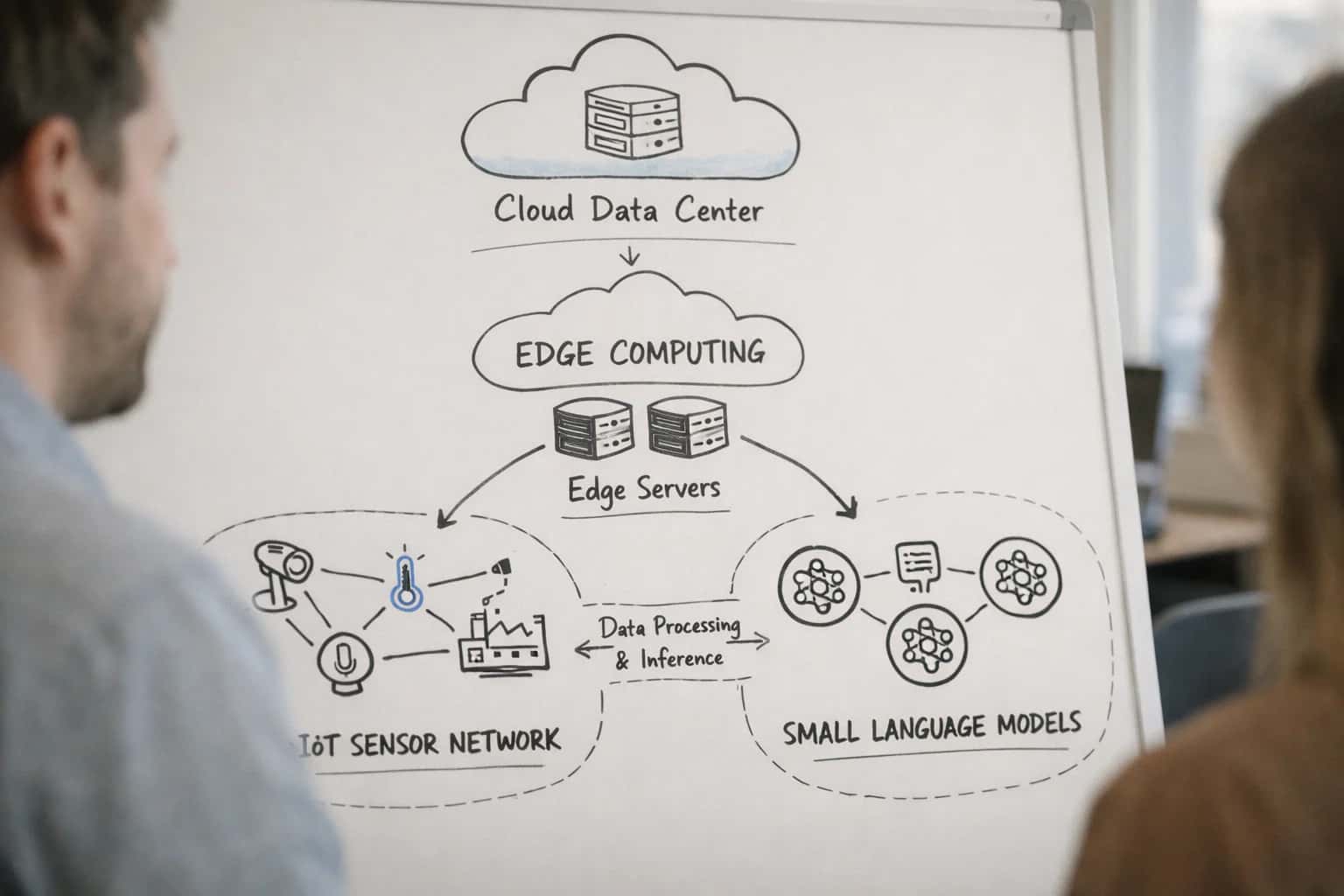
This guide explains how to build an intelligent routing layer that directs inference requests to the optimal location based on real-time constraints like latency, cost, and model availability.
Implementing this system requires three core components: a policy engine to evaluate routing rules, a high-performance proxy like Envoy to intercept and redirect requests, and integration with a model registry such as MLflow for service discovery. You will configure health checks for heterogeneous edge nodes, implement weighted load balancing for model variants, and set up real-time telemetry collection. This guide provides the actionable steps to build this routing layer, a critical capability for scalable Edge Inference and Distributed Computing Grids.
DYNAMIC MODEL ROUTING
Key Concepts
Master the core components required to build an intelligent routing layer that directs AI inference requests to the optimal compute location—cloud, edge, or device—in real-time.
01
Routing Policy Engine
The routing policy engine is the brain of your system. It evaluates real-time constraints—latency, cost, model availability, node health—to make placement decisions. Implement it as a microservice that:
- Ingests telemetry from edge nodes and network monitors.
- Applies declarative rules (e.g.,
latency < 50ms). - Integrates with Kubernetes schedulers like Kueue for enforcement.
Without a robust policy engine, routing is static and cannot adapt to changing conditions.
02
Service Mesh Integration (Envoy Proxy)
A service mesh like Envoy Proxy provides the data plane for dynamic routing. It handles the actual request forwarding based on rules from the control plane. Key configurations include:
- Weighted routing to split traffic between model versions.
- Circuit breaking to isolate unhealthy edge nodes.
- Retry logic for transient network failures.
Envoy's dynamic configuration API allows your policy engine to update routing rules in milliseconds without service restarts.
03
Model Registry & Inventory
A centralized model registry (e.g., MLflow, Neptune) tracks which models are deployed and where. Your routing layer must query this inventory to:
- Discover available model versions across locations.
- Check hardware compatibility (GPU vs. NPU).
- Enforce data sovereignty rules by keeping models in specific regions.
This registry acts as the single source of truth, preventing routing decisions from sending requests to nodes without the required model.
04
Health & Performance Telemetry
Dynamic routing requires a constant stream of health and performance data from all inference endpoints. Implement lightweight agents on each node to report:
- Node health: GPU memory, temperature, load.
- Model performance: P99 latency, throughput, error rates.
- Network conditions: Latency to the client and between nodes.
Aggregate this data in a time-series database (e.g., Prometheus) to feed your policy engine with the real-time state of the entire grid.
05
Fallback & Graceful Degradation
A robust routing system must plan for failure. Implement graceful degradation strategies:
- Primary-Secondary Routing: Route to the optimal edge node first; fail over to a regional cloud instance if latency thresholds are breached.
- Model Cascading: If a specialized model is unavailable, route to a more general (but larger) model that can still complete the task.
- Default Pathways: Define clear fallback hierarchies to ensure request completion, even at a higher cost or latency.
06
Cost-Aware Scheduling
Routing isn't just about latency; it's an optimization problem. Your system should incorporate cost-aware scheduling to minimize infrastructure spend. This involves:
- Assigning a monetary cost to each inference location (edge server vs. cloud GPU).
- Evaluating the trade-off between cost and performance for each request type.
- Implementing batching at edge nodes to amortize cost over multiple requests.
This turns your routing layer from a reactive switch into a proactive cost-optimization engine.
FOUNDATION
Step 1: Design the Routing Architecture
The routing layer is the intelligent traffic controller for your edge AI grid. This step defines the core logic that directs each inference request to the optimal compute location.
A dynamic model router evaluates real-time constraints—latency, cost, model availability, and data locality—to select the best execution target: a far-edge device, a regional edge server, or the central cloud. You implement this as a dedicated service, often using a high-performance proxy like Envoy with custom filters, that integrates with a model registry (e.g., MLflow) and a telemetry system. The architecture must support policy-based routing, where rules can dictate fallback behaviors, such as sending a request to the cloud if the local edge node's GPU is overloaded.
Start by defining your routing policies as code. For example, a policy might state: 'For video analytics tasks, route to any edge node with a GPU under 80% load and <50ms network latency; otherwise, use the regional cloud.' Implement these rules in your router and integrate health checks to monitor node status and model readiness. This creates the foundation for a system that automatically adapts to changing network conditions and workload demands, a core concept for managing distributed AI infrastructure at scale.
POLICY TYPES
Routing Policy Comparison
Comparison of core routing strategies for directing inference requests across a distributed AI grid.
| Policy / Metric | Latency-First | Cost-Optimized | Availability-First |
|---|---|---|---|
Primary Objective | Minimize end-to-end latency | Minimize compute & data transfer cost | Maximize successful request completion |
Decision Inputs | Real-time latency probes, node proximity | Pricing API, data egress costs, spot instance status | Node health status, model version availability, error rates |
Typical Use Case | Real-time video analytics, autonomous systems | Batch processing, non-critical analytics, development | Mission-critical systems, high-reliability services |
Fallback Behavior | Fails over to next-lowest-latency node | Reroutes to pre-defined cost ceiling; may increase latency | Retries on same node; uses canary nodes if primary fails |
Integration Complexity | Medium (requires continuous latency mesh) | High (requires cost feeds and business logic) | Low (relies on health checks and service discovery) |
Impact on SLOs | Optimizes for latency SLO (<100ms) | May violate latency SLO to meet cost targets | Optimizes for uptime & success rate SLOs (>99.9%) |
Best Paired With | Geo-distributed AI Inference Network | Cost-Optimized Edge AI Infrastructure | Resilient AI Grid for Critical Infrastructure |
Enabling Efficiency, Speed & Accuracy
Intelligent Analysis, Decision & Execution
We build AI systems for teams that need search across company data, workflow automation across tools, or AI features inside products and internal software.
Talk to Us
Search across company data
Give teams answers from docs, tickets, runbooks, and product data with sources and permissions.
Useful when people spend too long searching or get different answers from different systems.
Enterprise searchRAGPermissions
Read more
Automate internal workflows
Use AI to route work, draft outputs, trigger actions, and keep approvals and logs in place.
Useful when repetitive work moves across multiple tools and teams.
AI agentsWorkflow automationGovernance
Read more
Add AI to products and internal tools
Build assistants, guided actions, or decision support into the software your team or customers already use.
Useful when AI needs to be part of the product, not a separate tool.
AI integrationDecision supportModel routing
Read moreDYNAMIC MODEL ROUTING
Common Mistakes
Dynamic model routing is critical for efficient edge inference, but implementation pitfalls can lead to latency spikes, failed requests, and operational overhead. This section addresses the most frequent developer errors and how to fix them.
Cascading failures occur when your routing layer treats all edge nodes as equally healthy. A common mistake is using a simple round-robin or random selection algorithm without integrating real-time health checks.
The Fix: Implement a circuit breaker pattern and weighted health scoring. For each node, track:
- Latency percentiles (p50, p99)
- Error rates over a sliding window
- Model availability (is the requested model loaded?)
Use these metrics to dynamically adjust routing weights. A node exceeding a defined error threshold should be temporarily removed from the pool. Integrate this with your service mesh (like Istio or Envoy Proxy) for automatic failover. Always have a fallback route to a reliable cloud instance to prevent total service disruption.

About the author
Prasad Kumkar
CEO & MD, Inference Systems
Prasad Kumkar is the CEO & MD of Inference Systems and writes about AI systems architecture, LLM infrastructure, model serving, evaluation, and production deployment. Over 5+ years, he has worked across computer vision models, L5 autonomous vehicle systems, and LLM research, with a focus on taking complex AI ideas into real-world engineering systems.
His work and writing cover AI systems, large language models, AI agents, multimodal systems, autonomous systems, inference optimization, RAG, evaluation, and production AI engineering.
LinkedIn
Limited slotsGet a Free AI Consultation
Partnered with leading AI, data, and software stack.





How We Work
Custom AI workflows for your Business
One-fit-all AI don't work for modern businesses. At Inferensys, we aim to understand your business & custom requirements; which we use to define most efficient agentic workflows, the data, and the tools for your business.
01
Review the use case
We understand the task, the users, and where AI can actually help.
Read more02
Pick the right approach
We define what needs search, automation, or product integration.
Read more03
Build the first useful version
We implement the part that proves the value first.
Read more04
Improve from there
We add the checks and visibility needed to keep it useful.
Read moreThe first call is a practical review of your use case and the right next step.
Talk to Us