Modern POS platforms like Lightspeed Retail, Shopify POS, Square Retail, and Clover generate a continuous stream of high-fidelity demand data: SKU-level sales, time-stamped transactions, and store-level depletion rates. The traditional break occurs when this data must be manually interpreted, aggregated in spreadsheets, and pushed into separate procurement or ERP systems like NetSuite or SAP. An AI integration closes this loop by deploying agents that monitor POS webhooks and APIs, transforming raw sales into structured supply chain events. Key data objects include SalesLineItem, InventoryCount, and ProductVariant, which feed into AI models that predict reorder points, generate draft purchase orders, and trigger vendor communication workflows—all within the same business day.

Integration
AI Integration for POS Supply Chain Integration
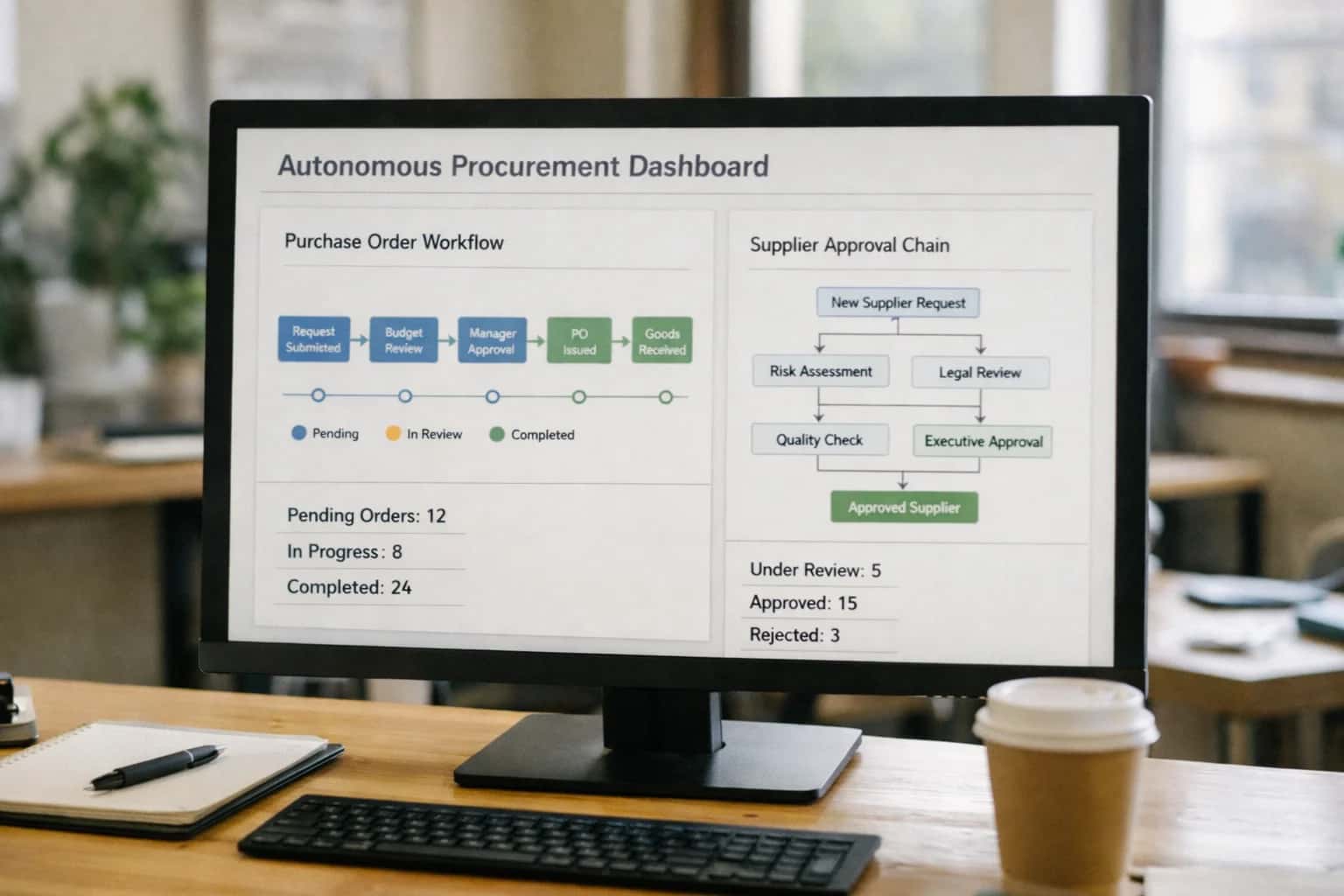
Closing the Loop Between POS Sales and Supply Chain Execution
A technical blueprint for connecting real-time POS demand signals directly to procurement, logistics, and warehouse systems using AI agents.
Implementation typically involves a middleware layer—often a queue-based system like Apache Kafka or cloud-native event buses—that ingests POS events. AI agents subscribed to these streams perform several core functions: 1) Anomaly Detection on sales velocity to flag potential stockouts or forecasting errors, 2) Automated Replenishment by comparing predicted demand against current stock levels in the WMS or ERP, and 3) Vendor Orchestration by drafting PO emails, checking vendor portals for order status, and updating shipment tracking in the system of record. For example, a low_stock_alert from the POS can trigger an agent that checks lead times, calculates an optimal order quantity, routes the PO for manager approval via Slack or Teams, and finally posts the approved order to the vendor's API or procurement platform like Coupa or SAP Ariba.
Rollout should be phased, starting with a pilot category of non-perishable, high-velocity SKUs. Governance is critical: all AI-generated actions (e.g., POs, vendor messages) should be logged to an audit trail and, in initial phases, require human-in-the-loop approval. This ensures accuracy and builds trust in the automation. The final architecture creates a real-time, closed-loop system where a sale at the register can influence a warehouse pick list or a container shipment within hours, turning POS systems from passive record-keepers into active participants in the supply chain. For a deeper dive on the foundational patterns, see our guide on AI Integration for Retail Point of Sale Platforms.
Where AI Connects: POS Data Hooks and Supply Chain Touchpoints
Core Replenishment Automation
POS platforms expose inventory levels, variant details, and supplier information via REST APIs. AI agents connect here to monitor stock counts, predict reorder points using sales velocity and seasonality, and automatically generate purchase orders.
Key Integration Points:
GET /inventory/levels– Real-time stock data per SKU and location.POST /purchase_orders– Automated PO creation with line items, quantities, and preferred vendors.GET /vendors– Supplier lead times and contact details for automated communication.
Example Workflow: An AI model analyzes a week of sales data from the POS, identifies SKUs dipping below a dynamic safety stock threshold, drafts a PO in the system, and routes it for manager approval via webhook. This reduces stockouts and manual procurement work from daily checks to exception handling.
High-Value AI Supply Chain Use Cases for Retailers
Connect AI directly to your POS platform's APIs to transform raw sales data into automated supply chain actions, reducing stockouts, cutting manual work, and improving vendor coordination.
Automated Purchase Order Generation
AI monitors real-time SKU-level sales velocity and current stock levels from the POS. When a reorder point is predicted, it automatically drafts and sends a purchase order to the vendor via email or API, including negotiated terms and delivery windows. This shifts replenishment from a weekly manual review to a continuous, event-driven process.
Intelligent Vendor Communication & Tracking
An AI agent acts as a vendor liaison, handling routine communications. It sends order confirmations, follows up on shipment ETAs, and parses carrier tracking updates. If a delay is detected, it automatically notifies store managers and can suggest substitutions for affected SKUs based on real-time POS sales patterns.
Dynamic Safety Stock Calculation
Instead of static par levels, AI analyzes POS transaction history, seasonality, and local events to calculate dynamic safety stock for each store-SKU combination. It continuously adjusts these targets within your inventory management system, optimizing capital tied up in inventory while protecting against demand spikes.
Cross-Dock & Allocation Optimization
For retailers with central DCs, AI uses real-time POS demand signals from multiple stores to optimize inbound shipment allocation. It determines which items should be cross-docked directly to stores versus held in the DC, and generates optimized pick lists, reducing handling and speeding time to shelf.
Supplier Performance & Risk Scoring
AI analyzes historical data from the POS and procurement systems to score vendors on on-time delivery, fill rate, and quality. It flags at-risk suppliers, suggests alternates, and can automatically adjust order lead times in the system for poor performers, de-risking the supply chain.
Automated Returns-to-Vendor Workflows
When a defective or recalled item is processed as a return at the POS, AI triggers the RMA workflow. It identifies the responsible vendor, generates the RMA authorization and shipping label, updates inventory, and initiates the credit process—all without manual data entry from store staff.
End-to-End AI Supply Chain Workflow Examples
These concrete automation flows illustrate how AI connects real-time POS sales data to procurement, logistics, and inventory systems, turning demand signals into immediate, intelligent supply chain actions.
Trigger: A POS transaction reduces on-hand inventory for a specific SKU below its AI-calculated dynamic safety stock level.
Context Pulled: The AI agent queries the POS system's inventory API for the current stock level, sales velocity (last 7/30 days), and seasonality factor. It then checks the item's supplier lead time and minimum order quantity from the connected Vendor Management System or ERP.
Agent Action: A procurement agent uses a forecasting model to calculate the optimal reorder quantity, balancing holding costs against stockout risk. It drafts a purchase order with the selected vendor, including item, quantity, price (validated against contract), and requested delivery date.
System Update: The PO is posted to the ERP/Procurement system (e.g., NetSuite, SAP) via API for approval routing. The POS system's "On Order" quantity for that SKU is updated in near real-time via a webhook, providing accurate sell-through visibility to store associates.
Human Review Point: The drafted PO is sent to a buyer's queue in the procurement platform for a final review and approval before being sent to the vendor, ensuring oversight for high-value or non-standard items.
Implementation Architecture: Data Flow, APIs, and the AI Orchestration Layer
A technical blueprint for connecting POS demand data to supply chain systems using an AI orchestration layer.
The integration architecture connects three core systems: the POS platform (e.g., Lightspeed Retail, Shopify POS), the procurement/ERP system (e.g., NetSuite, SAP), and the AI orchestration layer. The flow begins with the POS system's transactional APIs, which stream real-time sales data, inventory depletion events, and low-stock alerts. This data is ingested into a central event queue. The AI layer subscribes to this queue, processing each event to calculate reorder points, predict lead times, and identify the optimal vendor and order quantity based on historical demand, seasonality, and current supplier performance data.
The AI agent then executes the workflow through a series of tool calls. It first validates the recommendation against business rules (e.g., minimum order values, approved vendor lists). Upon approval, it calls the procurement system's Purchase Order API to draft the PO, populating line items, costs, and delivery dates. Simultaneously, it may trigger a vendor communication workflow, using a language model to generate and send an order confirmation email via the vendor's portal or a connected communication platform. Finally, the agent creates a tracking record, subscribing to the carrier's webhook for shipment updates, which are then written back to both the POS inventory module and the procurement system to update expected receipt dates.
Rollout requires a phased approach, starting with a pilot for a single product category or store location. Governance is critical: all AI-generated POs should route through an approval queue in the procurement system for a human-in-the-loop review during the initial phases. The architecture must include comprehensive audit logging at each step—data input, AI reasoning, API call, and system response—to ensure traceability and facilitate model tuning. This setup transforms a manual, reactive process into a closed-loop system where POS demand directly drives supply chain execution, reducing stockouts and freeing buyers to focus on strategic vendor relationships.
Code and Payload Examples
Ingesting Real-Time POS Demand
POS platforms emit webhooks or push events for key transactions. The first step is to capture these signals and structure them for AI analysis. Below is a pattern for consuming a sale.completed webhook from a typical POS API, extracting SKU-level demand, and queuing it for processing.
python# Example: Webhook handler for POS demand signal from flask import Flask, request import json from datetime import datetime import boto3 # Using AWS SQS as a queue app = Flask(__name__) sqs = boto3.client('sqs') QUEUE_URL = 'https://sqs.us-east-1.amazonaws.com/123456789012/pos-demand-queue' @app.route('/webhook/pos/sale', methods=['POST']) def handle_sale_webhook(): payload = request.json # Validate and extract core fields store_id = payload.get('location_id') sale_time = datetime.fromisoformat(payload.get('created_at')) items = payload.get('line_items', []) # Transform each line item into a demand signal demand_signals = [] for item in items: signal = { 'event_type': 'DEMAND_SIGNAL', 'sku': item['sku'], 'quantity': item['quantity'], 'store_id': store_id, 'timestamp': sale_time.isoformat(), 'source': 'POS_WEBHOOK' } demand_signals.append(signal) # Send to queue for AI processing for signal in demand_signals: sqs.send_message( QueueUrl=QUEUE_URL, MessageBody=json.dumps(signal) ) return {'status': 'queued', 'signals': len(demand_signals)}, 200
This handler normalizes data from different POS systems (Lightspeed, Shopify, Square) into a unified DEMAND_SIGNAL schema, ready for AI-driven replenishment logic.
Realistic Operational Impact and Time Savings
This table illustrates the tangible workflow improvements when AI connects POS demand signals to procurement and logistics systems, moving from reactive, manual processes to proactive, automated operations.
| Process | Before AI | After AI | Key Impact & Notes |
|---|---|---|---|
Purchase Order Generation | Manual review of stock reports; Excel-based creation | AI-triggered PO drafts based on predicted stockouts | Reduces PO creation time from hours to minutes; human approval remains for final sign-off |
Vendor Communication | Email/phone follow-ups for quotes, ETAs, and issues | AI-driven status requests and exception alerts via vendor portals | Shifts communication from proactive chasing to exception management |
Shipment Tracking & Exception Handling | Manual checking of carrier sites for delays | AI monitors tracking feeds and flags anomalies for review | Moves from 'next-day' awareness to 'real-time' exception alerts |
Inventory Reconciliation | Weekly/Monthly manual counts vs. system records | AI predicts and highlights likely discrepancies for targeted counts | Focuses manual effort on high-risk items, improving count accuracy |
Replenishment Recommendation | Buyer intuition and static reorder points | AI-driven, multi-factor recommendations (sales velocity, season, promotions) | Optimizes stock levels, reducing both overstock and out-of-stock scenarios |
Backorder & Allocation Management | Manual triage and customer service updates | AI suggests optimal allocation and generates customer delay notifications | Improves customer experience and frees staff for complex cases |
Demand-Signal Analysis | Static reports on historical sales | AI correlates POS data with external factors (weather, events) for forecasts | Provides actionable intelligence for planning, not just historical reporting |
Governance, Security, and Phased Rollout Strategy
A secure, governed approach to connecting AI directly to your POS and supply chain systems.
A production AI integration for POS supply chain must operate within the existing security and data governance boundaries of your retail stack. This means treating the AI layer as a privileged system with controlled access to POS APIs (like Lightspeed's Inventory, PurchaseOrder, and Vendor endpoints), procurement platforms, and logistics APIs. Implement API key management, OAuth flows, and network-level security (VPCs, private endpoints) to ensure AI agents only access the data they need—typically real-time inventory levels, sales velocity, vendor catalogs, and shipment statuses. All AI-generated actions, like creating a purchase order or sending a vendor email, should be logged to an immutable audit trail linked to the originating POS transaction or forecast trigger.
Roll this out in phases to manage risk and demonstrate value. Phase 1: Read-Only Intelligence. Connect AI to POS historical data and current inventory feeds to generate daily reorder suggestions and shortage alerts, presented in a dashboard for buyer review. Phase 2: Assisted Workflows. Introduce AI agents that draft purchase orders and vendor communications within your procurement system, requiring a human buyer to review and approve each action before submission. Phase 3: Conditional Automation. For high-confidence, rule-based scenarios (e.g., restocking a fast-moving staple SKU from a pre-approved vendor), implement automated execution with a post-action summary and an override mechanism in the POS or procurement UI.
Governance is critical. Establish a cross-functional review board (Ops, IT, Procurement) to approve new automated workflows. Use feature flags in your integration layer to control rollout by product category, vendor, or store location. Continuously monitor key guardrails: the percentage of AI-suggested POs that are overridden, the accuracy of lead time predictions, and system latency during peak POS transaction hours. This controlled, iterative approach de-risks the integration, aligns stakeholders, and builds the operational trust needed to scale from automating a single product category to managing a significant portion of your replenishment workflow.
Enabling Efficiency, Speed & Accuracy
Intelligent Analysis, Decision & Execution
We build AI systems for teams that need search across company data, workflow automation across tools, or AI features inside products and internal software.
Talk to Us
Search across company data
Give teams answers from docs, tickets, runbooks, and product data with sources and permissions.
Useful when people spend too long searching or get different answers from different systems.

Automate internal workflows
Use AI to route work, draft outputs, trigger actions, and keep approvals and logs in place.
Useful when repetitive work moves across multiple tools and teams.

Add AI to products and internal tools
Build assistants, guided actions, or decision support into the software your team or customers already use.
Useful when AI needs to be part of the product, not a separate tool.
Frequently Asked Questions for Technical Buyers
Technical questions for architects and engineering leads planning AI integrations between POS platforms and supply chain systems.
This workflow connects real-time POS demand signals to procurement systems with minimal manual intervention.
- Trigger: A nightly batch job or real-time webhook from the POS (e.g., Lightspeed Retail's Inventory API) fires when a SKU's stock level crosses a dynamically calculated reorder point.
- Context/Data Pulled: The AI agent retrieves:
- Current POS stock levels and recent sales velocity.
- Supplier lead times and minimum order quantities from the ERP or P2P system (e.g., NetSuite, Coupa).
- Open purchase orders and inbound shipment status.
- Model/Agent Action: A model analyzes the data to recommend an order quantity, balancing holding costs against stockout risk. An agent then drafts a complete purchase order payload, including item, quantity, cost, and requested delivery date.
- System Update: The agent calls the procurement system's API (e.g., SAP Ariba
purchaseOrdersendpoint) to create the PO, and posts a log back to the POS item record or a central audit log. - Human Review Point: For orders exceeding a predefined cost threshold or involving new suppliers, the PO is routed to a manager's queue in the procurement system for approval before submission.

About the author
Prasad Kumkar
CEO & MD, Inference Systems
Prasad Kumkar is the CEO & MD of Inference Systems and writes about AI systems architecture, LLM infrastructure, model serving, evaluation, and production deployment. Over 5+ years, he has worked across computer vision models, L5 autonomous vehicle systems, and LLM research, with a focus on taking complex AI ideas into real-world engineering systems.
His work and writing cover AI systems, large language models, AI agents, multimodal systems, autonomous systems, inference optimization, RAG, evaluation, and production AI engineering.
Partnered with leading AI, data, and software stack.





How We Work
Custom AI workflows for your Business
One-fit-all AI don't work for modern businesses. At Inferensys, we aim to understand your business & custom requirements; which we use to define most efficient agentic workflows, the data, and the tools for your business.
01
Review the use case
We understand the task, the users, and where AI can actually help.
Read more02
Pick the right approach
We define what needs search, automation, or product integration.
Read more03
Build the first useful version
We implement the part that proves the value first.
Read more04
Improve from there
We add the checks and visibility needed to keep it useful.
Read moreThe first call is a practical review of your use case and the right next step.
Talk to Us