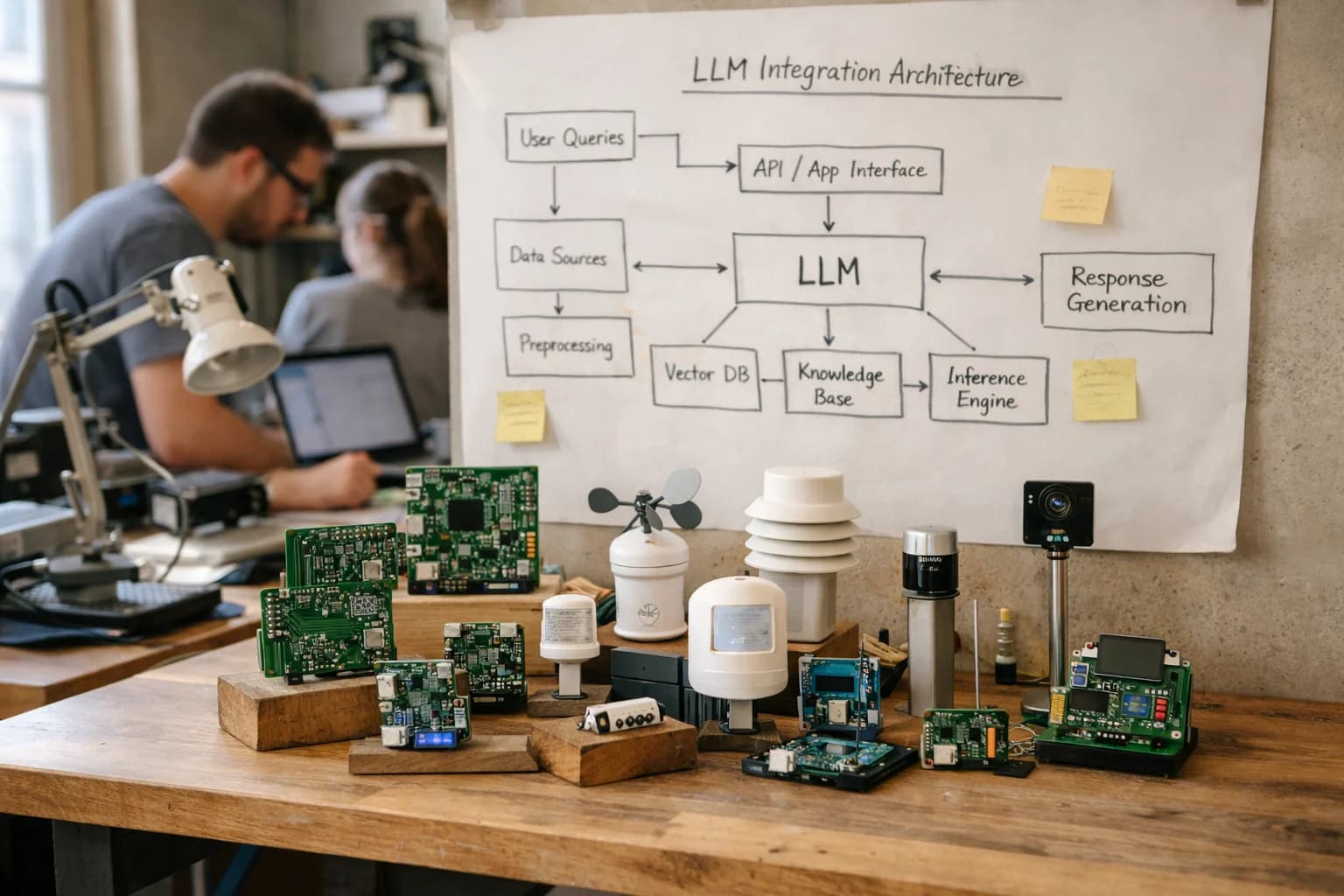
Architect production-ready integrations between RPA platforms (UiPath, Automation Anywhere, Blue Prism, Power Automate) and LLMs to add reasoning, content generation, and unstructured data interpretation to your automation workflows.
Large Language Models act as the cognitive layer for RPA, enabling bots to interpret, reason, and generate content within structured workflows.
LLMs integrate into your RPA platform—UiPath, Automation Anywhere, Blue Prism, or Power Automate—as a secure, API-driven service. They connect at key automation surfaces: within Document Understanding workflows for complex extraction, inside Attended Automation assistants like UiPath Assistant or AA AARI for real-time guidance, and in the Orchestrator/Control Room for intelligent exception handling and dynamic queue routing. The integration is typically a secure HTTP call from your bot script to an LLM endpoint (OpenAI, Anthropic, Azure OpenAI, or a private model), passing context from the workflow's data objects and receiving structured JSON or text for the next step.
This creates a clear separation of concerns: the RPA bot handles the deterministic 'doing'—logging in, clicking, reading fields, writing to systems—while the LLM handles the non-deterministic 'thinking'. For example, a bot processing invoices can pass an extracted vendor name and amount to an LLM to classify the expense category based on historical memos, or a service desk bot can use an LLM to summarize a customer email and populate a ticket's priority and description fields in ServiceNow. The bot remains the system of record for execution, audit logs, and credential management, while the LLM acts as a stateless reasoning engine.
Rollout requires a governance layer. Implement a central API gateway (like Kong or Apigee) to manage LLM calls, enforce rate limits, apply prompt templates, and log all interactions for cost and compliance. Start with a pilot in a single, high-value workflow—such as claims triage in insurance or contract review in legal—where the LLM's output is reviewed by a human-in-the-loop via the RPA platform's action center before full automation. This phased approach de-risks the integration and builds the operational muscle for prompt management, output validation, and model evaluation.
WHERE AI CONNECTS TO THE AUTOMATION STACK
Integration Surfaces Across Major RPA Platforms
AI for Unstructured Inputs
This layer integrates LLMs and vision models with RPA's document processing modules to handle exceptions and complex extraction.
Key Surfaces:
UiPath Document Understanding: Replace or augment template-based OCR with LLMs for contract clause extraction, invoice line-item validation, and form classification.
Automation Anywhere IQ Bot: Use custom LLM prompts to interpret ambiguous fields in scanned documents (e.g., handwritten notes on claims forms) and provide confidence-scored extractions.
Blue Prism Decipher / Power Automate AI Builder: Call external vision APIs or fine-tuned models via REST to process diagrams, poor-quality scans, or non-standard documents.
Implementation Pattern: The RPA bot captures the document, sends it to a secure AI service endpoint, receives structured JSON, validates against business rules, and enters data into the target system. Human-in-the-loop review is configured for low-confidence extractions via platforms like UiPath Action Center.
PRACTICAL PATTERNS
High-Value Use Cases for RPA + LLM Integration
Move beyond simple screen scraping. Integrate Large Language Models directly into your RPA workflows to handle unstructured data, make contextual decisions, and generate human-quality content, transforming attended and unattended automation.
01
Intelligent Document Processing (IDP)
Augment OCR with LLMs to classify, extract, and validate data from invoices, contracts, and forms. LLMs handle layout variations, infer missing context, and cross-check extracted data against business rules before RPA bots enter it into ERP or CRM systems.
Batch -> Real-time
Processing cadence
02
Exception Handling & Self-Healing Bots
When a bot encounters an error or unexpected screen, an LLM analyzes the screenshot, logs, and application state to diagnose the issue. It can suggest a fix, retrieve a workaround from a knowledge base, or draft a precise escalation note for a human operator in the Action Center.
Hours -> Minutes
MTTR reduction
03
Conversational Attended Automation
Embed an AI copilot within UiPath Assistant or Automation Anywhere AARI. Employees use natural language to query systems, request reports, or launch complex bots. The LLM interprets the request, structures the input, and guides the user through multi-step attended workflows.
1 sprint
Typical pilot timeline
04
Communications Mining & Workflow Triggering
Use LLMs to analyze customer emails, support tickets, and chat logs ingested by RPA. Extract intent, sentiment, and key entities to automatically categorize, route, and trigger downstream automations—like creating a service ticket in ServiceNow or updating a case in Salesforce.
Same day
Response time improvement
05
Dynamic Content Generation & Personalization
RPA bots gather structured data from SAP or a CRM, then call an LLM to draft personalized emails, generate contract clauses, or write summary reports. The bot then routes the content for approval or inserts it directly into output documents, streamlining communications workflows.
Batch -> Real-time
Content creation
06
AI-Augmented Process Discovery
Feed process mining and task mining data (from UiPath Process Mining or AA Discovery Bot) into an LLM. It generates natural-language summaries of inefficiencies, recommends specific automation candidates with estimated effort, and even drafts initial robot process definitions for developer review.
Hours -> Minutes
Analysis time
PRACTICAL PATTERNS
Example AI-Augmented RPA Workflows
These workflows illustrate how to securely integrate LLMs (like OpenAI GPT-4, Anthropic Claude, or open-source models) within RPA platforms to handle unstructured data, make contextual decisions, and generate communications, moving beyond rigid, rules-based automation.
This workflow uses LLMs to interpret complex, non-standard invoices where template-based OCR fails.
Trigger: An invoice PDF is uploaded to a designated network folder or email inbox.
Context Pulled: The RPA bot (UiPath/AA/Blue Prism) extracts raw text using native OCR or a service like Azure Form Recognizer.
Model Action: The bot calls an LLM via a secure API with a structured prompt:
json
{
"system_prompt": "You are an invoice parsing assistant. Extract the following fields: vendor_name, invoice_number, invoice_date, total_amount_due, line_items (list of description, quantity, unit_price). If a field is missing or ambiguous, return 'UNKNOWN' and provide a reason.",
"user_prompt": "[Raw extracted invoice text]"
}
System Update: The bot parses the LLM's JSON response and validates amounts against the PO in the ERP (e.g., NetSuite, SAP). For clear matches, it creates the invoice record automatically.
Human Review Point: If the LLM returns UNKNOWN for a critical field or the amount variance exceeds a threshold, the bot creates a task in the RPA platform's action center (UiPath Action Center, AA AARI) with the LLM's reasoning and the original document attached for a human clerk to review and resolve.
PRODUCTION PATTERNS FOR RPA + LLM
Implementation Architecture: Secure, Governed, and Scalable
A practical guide to wiring large language models into your RPA platform for production-grade cognitive automation.
Integrating LLMs into RPA workflows requires a secure, governed architecture that treats the AI as a controlled service, not a black box. The core pattern involves your RPA bot (in UiPath Studio, Automation Anywhere Bot Creator, or Blue Prism Process Studio) acting as the orchestrator: it gathers context from the target application (e.g., a scanned invoice, a customer email, a transaction error), constructs a secure API call to your LLM endpoint (OpenAI, Anthropic, or a private model), and processes the structured response to make a decision or populate a field. This is typically done via HTTP activities or dedicated AI connectors, with all prompts, inputs, and outputs logged to the RPA platform's control room (UiPath Orchestrator, AA Control Room, Blue Prism Control Room) for full auditability.
For high-value processes, implement a layered governance model. Use the RPA platform's credential vault to manage API keys, never hardcoding them. Route all LLM calls through an internal API gateway (like Apigee or Kong) for rate limiting, cost tracking, and policy enforcement—such as blocking certain data types from leaving the network. For processes involving sensitive data, implement a data masking step within the bot before the API call, stripping PII/PHI and replacing it with tokens. The bot should handle LLM responses as 'suggestions,' not commands, often routing them to a human-in-the-loop queue (like UiPath Action Center or AA AARI) for approval before taking final action, especially for financial or compliance-critical steps.
Rollout should be phased. Start with a pilot in a single attended automation (e.g., a UiPath Assistant task for a service rep) where the LLM assists with document summarization or email drafting. Monitor accuracy, latency, and user feedback. Then, scale to unattended, high-volume workflows (like invoice processing), where the bot uses the LLM for extraction and validation, but has fallback rules to route exceptions. Continuously evaluate model performance using the RPA platform's logging; if accuracy drifts, trigger a retraining workflow. The goal is a resilient system where the RPA bot remains in control, using AI as a powerful, but governed, tool within a known and auditable automation pipeline.
PRACTICAL INTEGRATION PATTERNS
Code and Payload Examples
Calling an LLM from a UiPath or AA Bot
The most common pattern is to invoke an LLM API from within an RPA script to process text. This example shows a Python activity within a UiPath bot making a secure call to an OpenAI-compatible endpoint, passing context from the automation.
python
import requests
import json
# Context extracted by the bot (e.g., from an email, document, or form)
extracted_text = "Customer email states: 'My invoice #INV-78901 from last month is incorrect. The quantity for item SKU-456 should be 10, not 100.'"
payload = {
"model": "gpt-4o-mini",
"messages": [
{"role": "system", "content": "Extract structured data from customer service text. Return JSON with keys: 'issue_type', 'invoice_number', 'sku', 'corrected_quantity'. If not found, use null."},
{"role": "user", "content": extracted_text}
],
"temperature": 0
}
headers = {
"Authorization": f"Bearer {api_key}",
"Content-Type": "application/json"
}
# Call to a managed endpoint (e.g., via Kong API Gateway for security/audit)
response = requests.post("https://api-gateway.company.com/llm/openai/chat/completions",
headers=headers,
json=payload,
timeout=30)
if response.status_code == 200:
llm_output = response.json()
structured_data = json.loads(llm_output['choices'][0]['message']['content'])
# Bot now uses structured_data['invoice_number'] to lookup and correct ERP record
else:
# Log error to Orchestrator and route to Action Center for human review
raise Exception(f"LLM call failed: {response.text}")
This pattern keeps the bot logic simple, offloading complex interpretation to the LLM. The response is parsed as JSON for the bot to act upon.
AI-ENHANCED RPA WORKFLOWS
Realistic Operational Impact and Time Savings
This table illustrates the tangible efficiency gains when integrating Large Language Models into core RPA workflows, moving from rigid, rules-based automation to adaptive, cognitive processes.
Process Area
Traditional RPA
AI-Enhanced RPA
Implementation Notes
Invoice Data Extraction
Template-based OCR, manual exception review
LLM-augmented extraction, auto-validation
Reduces exception queue by 60-80%, handles semi-structured formats
Customer Email Triage
Keyword-based routing to queues
Intent & sentiment analysis, auto-categorization
Routes 85%+ of inquiries correctly, surfaces urgency for SLA adherence
Report Generation & Summarization
Bot assembles data, human writes narrative
Bot pulls data, LLM drafts executive summary
Cuts report finalization from hours to <30 minutes for review
Exception Handling & Resolution
Error triggers ticket, human investigates
AI classifies error, suggests fix, retrieves KB article
Resolves 40-50% of common exceptions without human intervention
Processes contracts in minutes vs. hours, ensures key dates captured
Legacy System Interaction
Screen scraping based on fixed coordinates
CV + LLM interprets UI context, adapts to changes
Reduces bot maintenance by 30-50%, improves resilience
New Process Discovery & Scoping
Manual analysis of recordings & logs
AI analyzes task mining data, proposes automation candidates
Identifies top 5 automation opportunities per department in days
ARCHITECTING FOR PRODUCTION
Governance, Security, and Phased Rollout
Integrating LLMs into RPA requires a deliberate approach to security, compliance, and operational risk.
When calling LLMs from RPA scripts, treat the model as a new, potentially unpredictable system of intelligence. Governance starts with the Orchestrator or Control Room. Define explicit policies for: which bots can call which AI endpoints (e.g., OpenAI, Azure OpenAI, Anthropic, open-source models); credential management via secure vaults; input/output logging for audit trails; and rate limiting to control costs. For processes handling PII, PHI, or financial data, implement pre-call data masking or use zero-retention, on-premises LLM deployments. In platforms like UiPath, this often means using AI Center for model governance or building custom activities that enforce these policies before the HTTP request is made.
A phased rollout is critical. Start with a pilot in a low-risk, high-impact attended automation, such as an UiPath Assistant copilot that helps a service agent draft responses by summarizing case notes from a CRM. This keeps a human in the loop for validation. Phase two moves to semi-automated workflows, like an Automation Anywhere IQ Bot process where an LLM extracts data from a complex invoice, but the result is routed to an Action Center or AARI for a quick human sign-off. The final phase is full, unattended automation for well-understood tasks, such as using a vision-augmented Power Automate Desktop flow to read a utility bill, where the LLM's role is strictly structured extraction with predefined validation rules against a database.
Monitor for model drift and operational exceptions. Integrate your RPA platform's logging (e.g., UiPath Insights, Automation Anywhere Bot Insight) with an LLM observability tool. Track metrics like token usage per process, latency spikes, and the frequency of human overrides. Establish a clear rollback procedure: if an LLM's output quality degrades, bots should fall back to a rule-based logic or immediately escalate. This layered approach—governed access, incremental automation, and continuous monitoring—ensures AI-enhanced RPA delivers reliable business impact without introducing unmanaged risk. For a deeper dive on securing these integrations, see our guide on AI Integration for RPA with API Management.
Enabling Efficiency, Speed & Accuracy
Intelligent Analysis, Decision & Execution
We build AI systems for teams that need search across company data, workflow automation across tools, or AI features inside products and internal software.
AI INTEGRATION FOR RPA WITH LARGE LANGUAGE MODELS
FAQ: Technical and Commercial Questions
Common questions from technical and business leaders planning to integrate LLMs (OpenAI, Anthropic, open-source) with UiPath, Automation Anywhere, Blue Prism, or Power Automate for cognitive automation.
Secure API integration is foundational. The pattern involves:
Credential Management: Store API keys in your RPA platform's credential vault (UiPath Orchestrator, AA Control Room, Blue Prism's Credential Manager). Never hardcode keys in scripts.
API Gateway Proxy: Route calls through an internal API gateway (e.g., Kong, Apigee). This provides:
Rate limiting and load balancing.
Centralized logging and audit trails.
IP allow-listing and request transformation.
Payload Construction in RPA: Use the platform's HTTP activity (e.g., UiPath's HTTP Request, AA's REST Web Service, Blue Prism's Web API). Structure the request with the prompt, model parameters, and any retrieved context.
Response Handling: Parse the JSON response, extract the completion, and implement error handling for timeouts, quota limits, or content filtering.
Example UiPath Payload Snippet:
json
{
"model": "gpt-4o",
"messages": [
{ "role": "system", "content": "You are a data extraction assistant." },
{ "role": "user", "content": "Extract the invoice number and total amount from: 'Invoice INV-2024-789, total due $1,250.75'" }
],
"temperature": 0.1
}
This approach keeps credentials secure, provides operational control, and fits within enterprise IT governance.
About the author
Prasad Kumkar
CEO & MD, Inference Systems
Prasad Kumkar is the CEO & MD of Inference Systems and writes about AI systems architecture, LLM infrastructure, model serving, evaluation, and production deployment. Over 5+ years, he has worked across computer vision models, L5 autonomous vehicle systems, and LLM research, with a focus on taking complex AI ideas into real-world engineering systems.
His work and writing cover AI systems, large language models, AI agents, multimodal systems, autonomous systems, inference optimization, RAG, evaluation, and production AI engineering.
Partnered with leading AI, data, and software stack.
How We Work
Custom AI workflows for your Business
One-fit-all AI don't work for modern businesses. At Inferensys, we aim to understand your business & custom requirements; which we use to define most efficient agentic workflows, the data, and the tools for your business.
The first call is a practical review of your use case and the right next step.