The integration surface is defined by the data objects that must stay synchronized. In DocuSign CLM, this includes the Agreement record with its extracted metadata—parties, effective dates, payment terms, renewal options, and financial obligations. In Oracle ERP, the critical touchpoints are the Project module (for budget and task alignment), Financials modules (for revenue recognition schedules and payment terms), and the Procurement module (for validating vendor master data and purchase order compliance). AI acts as the real-time validation layer, parsing newly executed contracts in CLM and checking them against live Oracle data before triggering any downstream financial provisioning.

Integration
AI Integration for DocuSign CLM and Oracle
A technical blueprint for connecting DocuSign CLM with Oracle Cloud ERP/Fusion. Use AI to automatically validate contract terms against Oracle project budgets, procurement policies, and financial controls, turning contract execution into an automated compliance checkpoint.
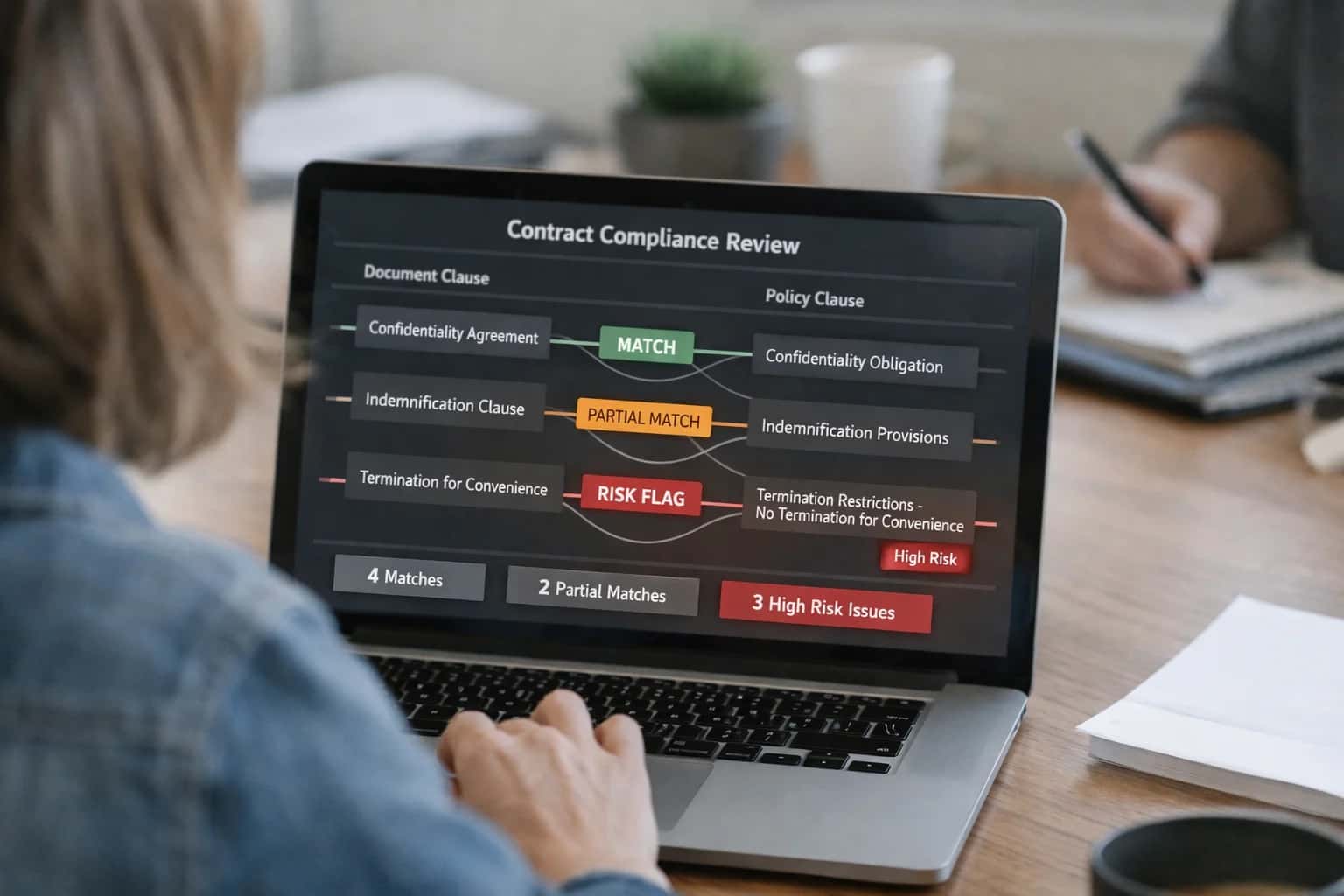
ARCHITECTURE FOR FINANCIAL AND OPERATIONAL ALIGNMENT
Where AI Bridges DocuSign CLM and Oracle ERP
A technical blueprint for using AI to validate contract terms in DocuSign CLM against project budgets, revenue schedules, and procurement rules in Oracle Cloud ERP.
A core AI workflow automates the setup of a Project Contract in Oracle based on a signed Services Agreement in DocuSign CLM. An AI agent extracts the SOW deliverables, milestone payment schedule, and billing rules from the contract attachment. It then calls Oracle's REST APIs to create the project structure, funding sources, and revenue plans, flagging any discrepancies—like a contract milestone date that falls outside the Oracle project's approved timeline—for human review. This turns a multi-day, manual reconciliation process into a same-day, auditable automation.
Governance is critical. This integration requires a human-in-the-loop approval step for any AI-proposed financial setup exceeding a predefined risk threshold, with a full audit trail logged back to the DocuSign CLM agreement record. Rollout typically starts with a single contract type (e.g., fixed-fee professional services) and a pilot Oracle instance. Success is measured by the reduction in manual data entry errors and the acceleration of time-to-revenue recognition. For teams managing this, our related guide on AI Integration for CLM and ERP Integration provides broader architectural patterns.
ARCHITECTURE BLUEPRINT
AI Touchpoints in DocuSign CLM and Oracle
Where AI Connects in DocuSign CLM
AI integration targets specific surfaces within the DocuSign CLM (formerly SpringCM) workflow to inject intelligence before human review.
Key Integration Points:
- Agreement Creation & Templates: AI can pre-populate contract templates by extracting deal terms from a connected CRM (like Salesforce) or a submitted web form, reducing manual data entry.
- Clause Library & Playbooks: During drafting, an AI agent can recommend optimal clauses from the library based on jurisdiction, product type, and historical outcomes, enforcing legal playbooks.
- Review & Approval Workflows: AI acts as a first-line reviewer, analyzing uploaded or drafted contracts against playbooks to flag risky clauses (e.g., unlimited liability, unusual termination) and route exceptions to the correct legal or business stakeholder.
- Repository & Search: A RAG (Retrieval-Augmented Generation) layer over the executed contract repository enables natural language Q&A (e.g., "Show all contracts with auto-renewal clauses in EMEA"), transforming passive storage into an active knowledge base.
These touchpoints allow AI to accelerate cycle times by handling pre-screening and data enrichment, allowing legal and procurement teams to focus on high-value negotiation and exception management.
ORACLE CLOUD ERP & FUSION
High-Value AI Use Cases for CLM-Oracle Integration
Integrating AI between DocuSign CLM and Oracle Cloud ERP transforms contract data into actionable financial and operational intelligence. These patterns automate validation, provisioning, and compliance workflows across the agreement-to-recognition lifecycle.
01
Automated Contract-to-Project Validation
AI validates new SOWs or amendments in DocuSign CLM against Oracle Project Portfolio Management (PPM) modules. It checks for alignment on budget codes, resource assignments, and billing milestones, flagging discrepancies before execution and auto-creating project structures upon signature.
Batch -> Real-time
Validation cycle
02
Intelligent Financial Provisioning
Upon contract execution, an AI agent extracts key financial terms (value, payment schedule, revenue recognition rules) and uses them to auto-generate and validate journal entries, schedules, and customer setups in Oracle Financials. This ensures accurate, timely booking and reduces manual reconciliation.
Same day
Revenue recognition
03
Procurement Contract Compliance
AI monitors active vendor contracts in CLM against Oracle Procurement and Supplier Portal data. It cross-references payment terms, volume discounts, and SLAs with actual PO and invoice data, alerting procurement to off-contract spend, missed rebates, or non-compliant purchases.
Proactive alerts
Risk mitigation
04
Obligation & Milestone Sync
An AI workflow parses executed contracts to identify deliverables, reporting deadlines, and renewal options. It creates tracked tasks in Oracle Fusion Cloud HCM (for internal owners) and syncs key dates to Oracle NetSuite or ERP calendars, ensuring nothing slips through the cracks.
Hours -> Minutes
Obligation mapping
05
AI-Powered Spend Under Management Analysis
A RAG-based analytics agent queries both the CLM repository and Oracle ERP spend data. It correlates contractually committed spend with actual invoices, identifying savings opportunities, leakage, and vendors for consolidation. Insights are pushed to Oracle Analytics Cloud dashboards.
Portfolio-wide
Spend visibility
06
Regulatory Clause Enforcement
For industries with strict financial compliance (e.g., SOX, ASC 606), AI scans contracts in CLM for clauses impacting Oracle General Ledger and Subledger accounting. It ensures required terms are present and flags contracts needing manual review before they are provisioned in the financial system.
Pre-provisioning
Compliance gate
ORACLE ERP INTEGRATION PATTERNS
Example AI-Driven Validation Workflows
These workflows demonstrate how AI can connect DocuSign CLM with Oracle Cloud ERP to validate contract terms against financial and project data, ensuring compliance and automating downstream operations.
Trigger: A new Statement of Work (SOW) contract is uploaded or drafted in DocuSign CLM for a project-based engagement.
AI Agent Action:
- Extracts key financial terms: total contract value, payment schedule (milestone-based), and project code references.
- Calls Oracle ERP APIs (e.g., Oracle Project Financial Management) to retrieve the approved budget for the referenced project.
- Validates the contract value and milestone amounts against the available budget.
System Update:
- If validation passes, the contract is automatically routed for signature in CLM.
- If a budget overage is detected, the AI agent:
- Flags the contract as
Requires Budget Review. - Generates a summary note for the reviewer detailing the variance.
- Optionally creates a change request in Oracle to initiate a budget revision workflow.
- Flags the contract as
Human Review Point: Contracts flagged for budget overage are routed to the project controller or finance manager for approval before proceeding.
AI-ENABLED CONTRACT VALIDATION
Implementation Architecture: Data Flow and AI Layer
A technical blueprint for integrating DocuSign CLM with Oracle Cloud ERP, using AI to validate contract terms against financial and project data.
The integration architecture establishes a bidirectional data flow between DocuSign CLM's Agreement Cloud and Oracle Cloud ERP modules—primarily Oracle Project Financial Management, Oracle Financials, and the Oracle Vendor Master. The core AI layer sits as a middleware service, listening for webhook events from DocuSign CLM (e.g., contract.executed, contract.updated) and polling for relevant updates in Oracle (e.g., project budget changes, vendor payment terms). When a contract reaches a key lifecycle stage, the AI service is triggered to perform validation tasks: extracting financial terms (payment schedules, milestone values, liability caps) via NLP, retrieving the linked Oracle project ID or vendor record, and comparing the contract's obligations against the system-of-record data for discrepancies.
A Retrieval-Augmented Generation (RAG) pipeline powers the validation logic. The AI service queries a vector store containing your organization's historical contract corpus, approved playbooks from DocuSign CLM, and Oracle project templates. This grounds the LLM's analysis in your specific financial policies and past deal structures. For example, when a new Statement of Work (SOW) is uploaded to DocuSign CLM for a project, the AI can: 1) Extract the total not-to-exceed value and payment milestones, 2) Retrieve the approved budget from the linked Oracle Project, 3) Flag if contract values exceed project funding or if milestone dates conflict with Oracle's project timeline, and 4) Generate a plain-language summary of risks for the project manager in the CLM's task feed.
Governance is built into the workflow. All AI-generated validations and flags are logged as audit trail entries in both systems, with a human-in-the-loop approval step required before any automated updates are pushed back to Oracle. For instance, if the AI detects a contractually agreed payment term that differs from the standard Net 45 in the Oracle Vendor Master, it can create a task in DocuSign CLM for the procurement owner to review and approve the sync. This controlled, event-driven architecture ensures financial integrity while automating the tedious cross-checking that typically delays project kick-offs and vendor onboarding by days or weeks. For related patterns on grounding AI in enterprise data, see our guide on RAG for Enterprise Systems.
ORACLE CLOUD ERP INTEGRATION PATTERNS
Code and Payload Examples
Validate Contract Terms Against Oracle Projects
When a contract is finalized in DocuSign CLM, a webhook can trigger an AI validation service to check financial terms against Oracle Cloud ERP modules. This ensures project budgets, billing milestones, and revenue recognition rules are aligned before the contract is activated.
Example Python Webhook Handler:
pythonfrom fastapi import FastAPI, HTTPException import httpx app = FastAPI() @app.post("/clm-webhook/contract-finalized") async def validate_contract_terms(webhook_payload: dict): contract_id = webhook_payload.get('contractId') # 1. Fetch contract JSON from CLM API clm_contract = await fetch_clm_contract(contract_id) # 2. Extract financial terms using AI service extracted_terms = await ai_extract_financial_terms(clm_contract['documentUrl']) # 3. Validate against Oracle Projects module validation_result = await validate_with_oracle_projects( project_id=extracted_terms['oracleProjectNumber'], contract_value=extracted_terms['totalValue'], milestone_schedule=extracted_terms['paymentMilestones'] ) # 4. Post validation summary back to CLM as a comment await post_validation_to_clm(contract_id, validation_result) return {"status": "validated", "contractId": contract_id}
The AI service parses the PDF to identify oracleProjectNumber, totalValue, and paymentMilestones, then calls the Oracle Projects REST API to check budget availability and milestone feasibility.
AI FOR CONTRACT-ERP ALIGNMENT
Realistic Time Savings and Business Impact
Expected operational improvements from integrating AI between DocuSign CLM and Oracle Cloud ERP to validate terms and automate financial provisioning.
| Workflow / Metric | Before AI Integration | After AI Integration | Implementation Notes |
|---|---|---|---|
Contract-to-Project Setup | 2-3 business days manual review and data entry | Same-day automated validation and creation | AI validates terms against Oracle Project module; human approves final setup |
Financial Provision Validation | Manual line-by-line check of payment terms vs. GL codes | Automated flagging of mismatches for review | AI cross-references contract clauses with Oracle Financials; reduces errors by ~70% |
Obligation & Milestone Tracking | Spreadsheet or calendar reminders, often missed | Automated tasks created in Oracle with alerts | AI extracts dates/deliverables from CLM; syncs to Oracle for owned-by tracking |
Renewal Forecast Accuracy | ±30 days based on manual review of expirations | ±7 days with AI-prioritized risk scoring | AI analyzes usage, relationship data, and contract language for likelihood prediction |
Spend Under Management Visibility | Quarterly manual reconciliation with high variance | Near real-time correlation of contract value to PO/invoice | AI links CLM pricing terms to Oracle Procurement & Payables; dashboard updates weekly |
Exception & Deviation Review | Legal/Finance manually screens all contracts | AI pre-approves 40-60% of low-risk, standard agreements | AI scores against playbooks; only exceptions routed for human review, cutting cycle time |
Audit & Compliance Evidence | Days to gather contract samples and proof of terms | Hours to generate compliance packs for specific clauses | AI-enabled search and report generation across CLM repository for audit requests |
ENTERPRISE ARCHITECTURE FOR AI-CLM-ERP INTEGRATIONS
Governance, Security, and Phased Rollout
A secure, governed approach to connecting AI, DocuSign CLM, and Oracle Cloud ERP for contract validation and financial automation.
Integrating AI across DocuSign CLM and Oracle Cloud ERP requires a zero-trust API architecture that respects the data sovereignty and access controls of each system. AI agents act as orchestrated intermediaries, calling the DocuSign CLM API to retrieve contract drafts and executed agreements, and the Oracle Fusion REST APIs (e.g., Projects, Financials, Procurement modules) to fetch real-time project budgets, PO details, and vendor master data. All AI prompts are grounded in retrieved data via a RAG pipeline using a vector store populated with your approved clause library and Oracle data schemas, ensuring responses are based on enterprise context, not public models. Sensitive data like financial terms or PHI is redacted before processing, and all AI actions are logged to a dedicated audit trail linked to the contract record in CLM and the relevant transaction in Oracle.
A phased rollout is critical for managing risk and proving value. Phase 1 typically automates the validation of a single, high-volume contract type—such as consulting SOWs—against Oracle Project financial data. An AI workflow triggers upon contract submission in DocuSign CLM, extracts the Project ID and Total Value, calls the Oracle Projects API to validate budget availability, and returns a pass/fail status with reasoning to the CLM workflow for approver review. Phase 2 expands to multi-term validation, checking payment schedules against Oracle Payables terms, or ensuring service levels align with Procurement SLA definitions. Phase 3 introduces predictive AI, analyzing historical contract and Oracle performance data to forecast renewal risk or flag contracts likely to exceed budget.
Governance is enforced through a human-in-the-loop (HITL) layer and a centralized prompt registry. For high-risk validations (e.g., contracts over a financial threshold or with new vendors), the AI's findings are presented as a recommendation requiring a human reviewer's approval in the CLM task queue before proceeding. All prompts used for extraction, validation, and summarization are version-controlled and tested for drift, ensuring consistent, compliant behavior. This structured approach allows finance, legal, and procurement teams to gain trust in the AI's outputs, starting with assistive recommendations and gradually moving towards automated execution for low-risk, rule-based validations.
Enabling Efficiency, Speed & Accuracy
Intelligent Analysis, Decision & Execution
We build AI systems for teams that need search across company data, workflow automation across tools, or AI features inside products and internal software.
Talk to Us
Search across company data
Give teams answers from docs, tickets, runbooks, and product data with sources and permissions.
Useful when people spend too long searching or get different answers from different systems.
Enterprise searchRAGPermissions
Read more
Automate internal workflows
Use AI to route work, draft outputs, trigger actions, and keep approvals and logs in place.
Useful when repetitive work moves across multiple tools and teams.
AI agentsWorkflow automationGovernance
Read more
Add AI to products and internal tools
Build assistants, guided actions, or decision support into the software your team or customers already use.
Useful when AI needs to be part of the product, not a separate tool.
AI integrationDecision supportModel routing
Read moreAI INTEGRATION FOR DOCUSIGN CLM AND ORACLE
Frequently Asked Questions
Practical questions for architects and operations leaders planning to connect DocuSign CLM with Oracle Cloud ERP using AI for automated term validation and financial alignment.
The AI integration acts as a real-time validation layer between DocuSign CLM and Oracle Cloud modules. Here's the typical workflow:
- Trigger: A contract (e.g., a Professional Services SOW) reaches a "Final Review" stage in DocuSign CLM.
- Context Pull: The AI agent extracts key financial and operational terms using a pre-trained model:
project_id,task_codereferencesbilling_rate,payment_terms,total_not_to_exceedvalueservice_start_dateandmilestone_dates
- Oracle API Calls: The agent calls Oracle REST APIs to fetch validation data:
- Oracle Projects: Validates the
project_idis active and thetask_codeis billable. - Oracle Financials: Checks the
billing_rateagainst the approved vendor rate card in the supplier master. - Oracle Risk: Confirms the
total_not_to_exceedvalue is within the project's remaining budget.
- Oracle Projects: Validates the
- AI Analysis & Report: The LLM compares the contract terms with the Oracle data, generating a plain-language validation report directly in the CLM record, flagging any mismatches (e.g., "Rate exceeds approved vendor rate by 15%").
- Workflow Action: Based on configurable rules, the CLM workflow can be paused for review, auto-approved if all checks pass, or trigger an update to the Oracle project budget record.

About the author
Prasad Kumkar
CEO & MD, Inference Systems
Prasad Kumkar is the CEO & MD of Inference Systems and writes about AI systems architecture, LLM infrastructure, model serving, evaluation, and production deployment. Over 5+ years, he has worked across computer vision models, L5 autonomous vehicle systems, and LLM research, with a focus on taking complex AI ideas into real-world engineering systems.
His work and writing cover AI systems, large language models, AI agents, multimodal systems, autonomous systems, inference optimization, RAG, evaluation, and production AI engineering.
LinkedIn
Limited slotsGet a Free AI Consultation
Partnered with leading AI, data, and software stack.





How We Work
Custom AI workflows for your Business
One-fit-all AI don't work for modern businesses. At Inferensys, we aim to understand your business & custom requirements; which we use to define most efficient agentic workflows, the data, and the tools for your business.
01
Review the use case
We understand the task, the users, and where AI can actually help.
Read more02
Pick the right approach
We define what needs search, automation, or product integration.
Read more03
Build the first useful version
We implement the part that proves the value first.
Read more04
Improve from there
We add the checks and visibility needed to keep it useful.
Read moreThe first call is a practical review of your use case and the right next step.
Talk to Us